

1 0BIntroduction
Digital forensics is a branch of forensic science related to legal evidence found on computers and digital storage media. The goal of computer forensics is to describe the current state of a digital artifact. The term digital artifact can refer to a computer system, storage media (such as a flash drive, hard disk, or CD-ROM), an electronic document (e.g. an email message, video, or JPEG) or even a series of data packets in a switch computer network [1]. The explanation searched for can simply be "What information do we have here?" to something as detailed as "What is the sequence of events that led to the current situation?"
Up until now collecting data for digital forensic purposes is mostly done by openly digging through the electronic device or devices commonly used by the suspect, such as desktop PCs, laptops and mobile phones. This is in accordance with legal procedure, but there is a considerable chance that the suspect has removed digital evidence that was on the device before. There are actually
many ways to resurrect deleted data, but there is no guarantee that the result will be complete in terms of numbers and contents as compared to when before they were removed. Consequently, when gathering evidence in many cases the police cannot gather sufficient evidence to have a suspect formally charged.
Studies concerning digital evidence collection methods for laptops and desktop computers have been reported in papers such as [2]-[7]. These studies resulted in the presence of applications and tools to collect, generate and analyze data, such as TCPdump, Ethereal, Argus, NFR, tcpwrapper, Sniffer, Nstat, Tripwire, ProDiscover, various keyloggers, disk copy, DD on Unix. All existing research related to technology uptake and collecting digital evidence can be classified based on the essence of the application functionality [8]-[10]. Other studies are related to the framework and management of digital forensics [11]-[14].
Figure 1 describes phases of digital forensics. There are four phases in digital forensics work [15],[16]. The first phase is the phase of collecting the digital evidence, which identifies where the evidence is located, where the evidence is stored, and how it can be taken for the purposes of the investigation. The second is the phase of testing the digital evidence, which consists of an assessment process and extracting relevant information from a variety of collected data. This phase also includes the process of bypassing or minimizing any features on various operating systems and applications that may render the data inaccessible, such as compression, encryption and access control mechanisms. This is vital to note, because only a slight change in the digital evidence can change the results of the investigation. The third phase is the analysis phase, which includes a variety of activities, such as identification of the user or outside users who are not directly involved, the location, the device, the incident and consideration of how all the components are linked together to come to a final conclusion. The fourth phase is the reporting phase, which is the process of documenting and reporting, including constructing alternative explanations, audience consideration and identification of actionable information derived from data collected earlier.
Specifically, digital forensics is the science and skill of identifying, collecting, analyzing and examining digital evidence when dealing with a case that requires the handling and identification of digital evidence [17],[18]. In general, digital forensics is divided into four branches. (1) Computer forensics, i.e. activities related to the analysis of the contents of computers, such as internet history, log file and the contents of various file types. (2) Mobile device forensics, which relates to the recovery of digital evidence from mobile devices. Mobile device forensics is different from computer forensics because there are linkages with in-built communication systems (for example GSM) and a proprietary storage mechanism at the mobile operator. Investigations usually focus on simple data
such as call logs and text communication (SMS/e-mail) rather than the recovery of deleted data. Mobile device forensics is also useful for providing location information, either from GPS or from tracking the location through triangulation of base transceiver stations. (3) Network forensics, which is related to the monitoring and analysis of local computer network traffic, WAN or the Internet, for the purpose of gathering information, gathering evidence, or the detection of interference from outside hackers. (4) Database forensics, which is related to the forensic study of databases and metadata, as discussed in references such as [19],[20]. Investigations are usually based on the contents of databases, log files and data in RAM to build a time-line or recovery of relevant information.
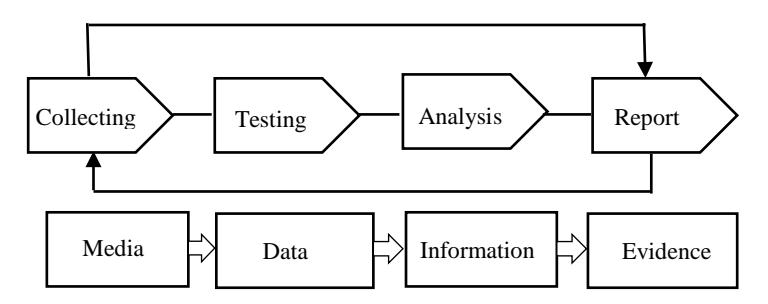
Figure 1 Phases of digital forensics.
In Indonesia there are laws regulating electronic information and transactions. Everything is summed up in ITE Law No. 11 of 2008. Inside there are 54 articles that regulate all electronic transactions, including electronic information, electronic transactions, information technology, electronic documents, electronic systems, electronic system implementations, networking of electronic systems, electronic agents, electronic certificates, electronic organizers, certificate reliability institutions, electronic signatures and signatories, and computer access subjects and the Internet. A description of illegal data collecting can be found in Chapters 30 to 32, with criminal provisions in Articles 46 to 48. Issues relating to this research about taking digital evidence legally can be found in Chapters 42 to 44.
2 Digital Evidence Collecting Methods
A good digital evidence collecting system must fulfill the requirements of existing parameters. Investigators should be able to filter the information from the available evidence without changing the authenticity of the evidence. Under federal law in the United States, there are requirements that need to be fulfilled with regards to the chain of custody and rules of evidence [21].
- (1) The chain of custody is the maintenance of evidence to minimize the damage caused by the investigator. The aim is that the evidence should be still completely original when presented at the trial and still the same as when it was found.
- (2) Rules of evidence, meaning that the evidence must have a relevant relationship with an existing case. There are four requirements that must be fulfilled: acceptable, authentic, complete, and reliable.
The existence of evidence, including digital evidence, is critical in the investigation of computer crime cases because with this evidence, the investigator and forensic analyst can uncover a case with a complete chronological timeline and then identify someone as a suspect and possibly later have him formally charged.
According to Law No. 11 of 2008 on Information and Electronic Transactions digital evidence is known as 'electronic information' or 'electronic documents' [22]. Based on this law, digital evidence can be divided into the following types: logical file, audio file, deleted file, video file, lost file, image file, slack file, e-mail, log file, username & password, encrypted file, SMS, MMS, BBM, steganography file, call log and office file.
Capturing network data packets is often done to observe users that are connected to a local network. By using existing tools such as Netstat, Wireshark and Cain & Abel, valuable data can be obtained. On Cain & Abel, detailed information about the connected users, such as IP addresses, MAC addresses, what site is being opened, the password and username that were entered for login, etc., can be seen. On Wireshark raw data can be taken, such as the cache and cookies from websites the user opened, and details such as tab source, destination, protocol, length, and information about the capture interface.
Criminals often take steps to conceal their crime and therefore deleted data can often contain the most incriminating digital evidence. Hence, one of the most useful processes is to recover files and folders that have been deleted. When dealing with a FAT or NTFS file system, most available recovery tools can recover files that have been deleted, but not all can recover folders that have been deleted and are not referenced by the file system. Although recovering deleted data from digital memory is very useful when done successfully, this method still has many weaknesses. Folder and file recovery tools often make assumptions that are not always appropriate. For example, when recovering deleted files many applications take the initial cluster and file size of the folder entry and set the next free cluster as part of the sequential file. These assumptions will be made when the initial failure cluster of a file that was removed is followed by a free cluster that actually refers to a different file that has also been deleted. Some automated file recovery tools fail to distinguish the directory entry of files that have been deleted and which were removed and overwritten. This weakness can be covered through applications that can perform file carving like Foremost, Scalpel, DataLifter and PhotoRec. However, this still cannot guarantee that the file can be resurrected perfectly and completely.
When dealing with protected individual files, a hex editor such as WinHex can be used, which works by removing password protection from a file. In addition, other specialized tools can bypass passwords or recover data from many types of files. Today's most powerful and most dependable tool to save protected and encrypted files is PRTK and DNA from AccessData [8]. Tools like this usually have a deficiency in the hardware limitations of the investigator. There are alternatives that allow working faster, which combine multiple computers. Distributed Network Attack (DNA) can perform brute-force 40-bit encryption of file types including Adobe Acrobat and Microsoft Office. Using a cluster of approximately 100 desktop super computers and the proper application will allow to try every possible 40-bit key in just five days. As for steganography, investigators must be careful with large files that look unnatural. To crack them, the investigator must manually search for the steganography software that the suspect used to hide the data. The file can be opened with the steganography software using a password obtained from the encryption solution.
EXIF IFDO @ Absolute 0x000000014 DirLength = 0x0010
 [Make ] = "NIKON CORPORATION"
 [Model ] = "NIKON D 7000"
 [Orientation ] = Row 0: top, Col 0: Left
 [X-Resolution ] = 300/1
 [Y-Resolution ] = 300/1
 [Resolution Unit ] = Inch
 [Software ] = "Ver. 1. 04"
 [Date-Time ] = "2014: 08: 17 08: 00: 31"
 [White-Point ] = 313/1000, 329/1000
 [Prim-Chromaticity ] = 64/100, 33/100, 21/100, 71/100, 15/100, 6/100
 [YCb-Cr-Coefficients ] = 299/1000, 587/1000, 114/1000
 [YCb-Cr-Positioning ] = Co-sited
 [EXIF-Offset ] = @0x01D8
Figure 2 EXIF data extracted from digital photo using JPE-GSNOOP.
As explained previously, embedded metadata can answer a variety of questions regarding a document, including the genuineness and authenticity of the source. Figure 2 shows exchangeable image file (EXIF) information that has been obtained from a photo file, such as the date and time the photo was taken, final copy, the camera used, etc. The information itself can supply an alibi or can be evidence of a crime.
Sometimes collecting data under legal procedures is hard to do. Investigators are often inhibited due to a lack of evidence, when the status of a suspect or accused has to be determined. The reasons may vary, but a case that often occurs in many countries is that the suspect has financial power so he can hire a team of lawyers to find loopholes in the law to impede further investigation. When an investigator encounters such blinding conditions, he must have good improvisational skills to use a trick in an attempt to obtain evidence [22]. Espionage as we often see in the movies is an example of social engineering, but actually only a basic example. Using informatics engineering, we should be able to come up with something more sophisticated than relying on the attractive appearance of a spy.
3 Two-Step Injection Method Design
The Two-Step Injection method (TSI) is a covert digital evidence retrieval system using a two-phase flash drive injection into the target's computer or laptop. This method emphasizes the principle of prevention of loss of digital evidence due to the action of removing digital data by the suspect or due to an accident. The first injection is the phase of planting the Content Module and collecting of initial data to be analyzed in order to decide what data to take next. The second injection is an iteration of the first injection and is the phase of harvesting data from the Content Module and collecting more data. The TSI
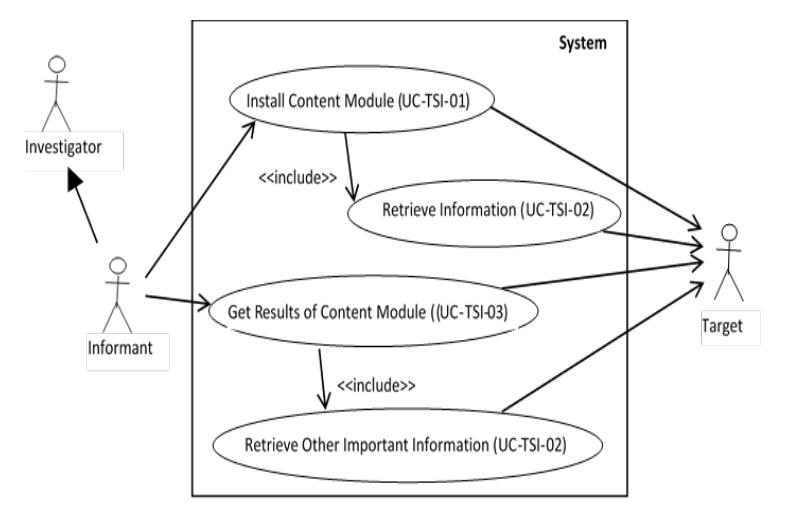
Figure 3 Use case diagram of TSI system.
method has several advantages compared with other methods, is shown in Table 1. Figure 3 represents a model of the TSI in the form of a use case diagram in order to clarify the application requirements, notably regarding its features and behavior. Table 2 and Table 3 describe the actors and a use case of the system respectively.
Table 1 Advantages of TSI system compared with other methods (network capture, deleted file retrieval, de-encryption, social engineering).
| Other Methods |
|---|
| Definitely violate it because of acting like a spy and stealing data directly |
| Cannot guarantee completely fulfilling either of the requirements of the rules of evidence |
| Are specific methods for one purpose with limited options |
| Are methods using "brute-force" capture/ copying are not efficient on memory |
| Simply copy files which damages the metadata of the files |
| Use a network capture method that provides raw data relies on target connecting to LAN |
| Use brute-force de-encryption methods that are hard and take a lot of time and could damage file metadata and affect the originality of the evidence |
| Use keyloggers for Windows that need to be installed first on the target's computer |
| Can use auto-run but must be set up first after installation |
| Consume more memory when running |
| Are not modular systems that can be constructed like Lego |
Table 2 Actors in TSI system.
| Actor | Description |
|---|---|
| Investigator | This actor has the authority to give directives and orders |
| (Ac-TSI-01) | directly to the informant |
| Informant | This actor has the task of social engineering to |
| (Ac-TSI-02) | successfully run the TSI method on the target |
| Target (Ac-TSI-03) | This actor is the source of the data to be retrieved by the TSI system, such as internet history, conversation history, documents, photos, history logs, passwords |
Table 3 Use case of TSI system.
| Use Case | Description | |
|---|---|---|
| UC-TSI-01 Install Content Module | System injects LAN client application with a keylogger and sets these applications to run from Windows start-up using the In-Out Module | |
| UC-TSI-02 Retrieve information | System duplicates the existing folders on suspect's computer/laptop to your flash disk to locate the layout documents and important information in order to make an analysis of material information for the second injection. UC-TSI-02 is run in conjunction with the UC-TSI-01 by using the In-Out Module | |
| UC-TSI-03 Get results of Content Module | System retrieves the results of the keylogger file (log.log) using in-out module. Remote investigations for monitoring and file transfer can use the LAN client application that is running on the target's computer or laptop. | |
| UC-TSI-04 Retrieve other important information | System takes other important data like documents, images, internet history, conversation history, that are needed as digital evidence using in-out module | |
3.1 Social Engineering Module
The Social Engineering Module is a user manual that is to be used by the informant before collecting data in order not to cause suspicion when injecting the flash disk. Because this module is not overly concerned with the application of the TSI system itself, what will be discussed here are the key points that need to be executed by the informant. The standard operation procedure (SOP) of the informant is explained in Figure 4.
3.2 In-Out Module
The In-Out Module, as the name suggests, is the module that serves to "open the door" in a secret way so that the content can pass. This module is used to automatically start the TSI system from auto-run when the informant's pen drive, flash drive or external hard disk is injected. Figure 5 shows DFD Level 1 of the In-Out Module. The In-Out Module consists of four files: autorun.inf, mulai.bat, in.vbs, and file.bat.
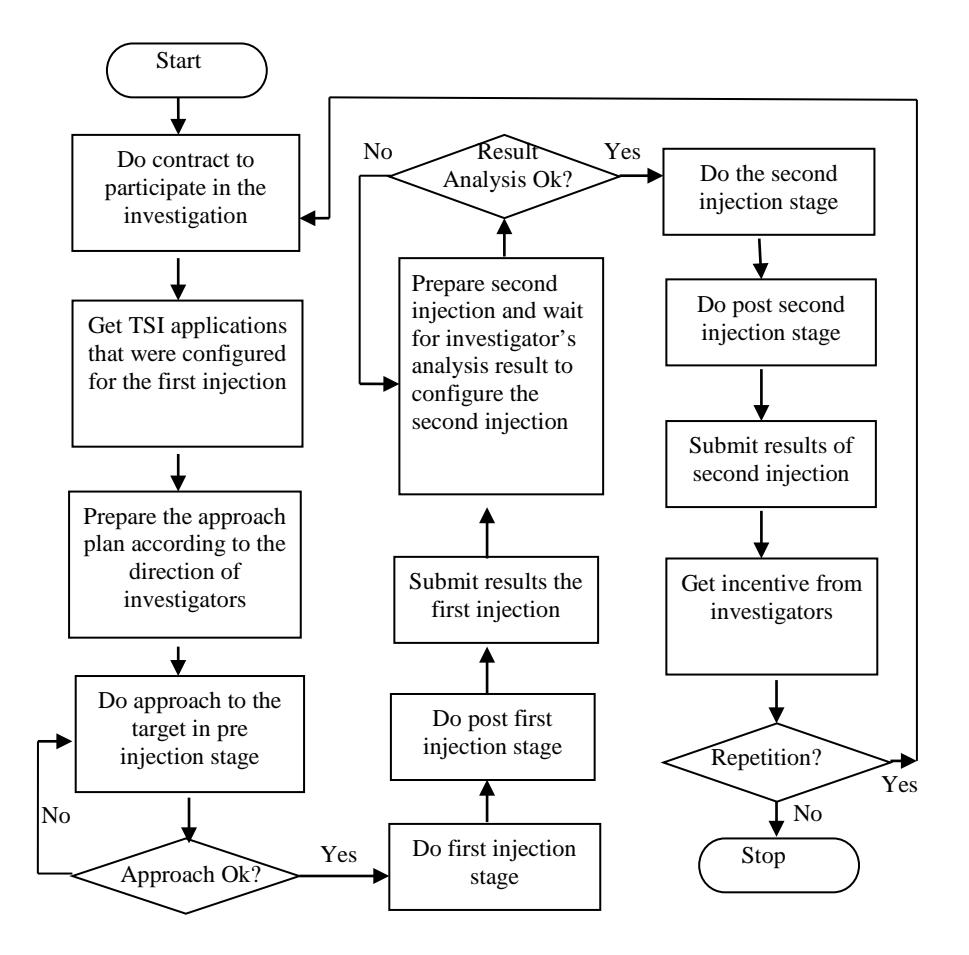
Figure 4 Flowchart SOP for the informant.
1) Autorun.inf is used for running the TSI system directly after the first injection. Auto-run is created hidden so it is not visible in Windows. Its core command is to open the mulai.bat file.
- 2) Mulai.bat is a script file that is used to run in.vbs and file.bat at once. The batch file does two things: first it will look in.vbs at the root of the flash disk and open it with file.bat so that the file.bat is run by a code in in.vbs.
- 3) In.vbs is a visual basic script file that is used to make file.bat invisible while it is being executed. It works by running file.bat as a process so it will not bring up the command prompt from a batch file.
- 4) File.bat is the core file that is used to read the data, write the data, set a trap, and take other content that is required. In it there are two core commands, "x-copy" and "robo-copy". "Robo-copy" is the main command for cloning, while backup is done with the command "x-copy" to copy data where it is not a problem if the metadata are missing, such as the Internet access folder histories from Firefox or Chrome. All files that are successfully taken will be collected in the main folder called All.
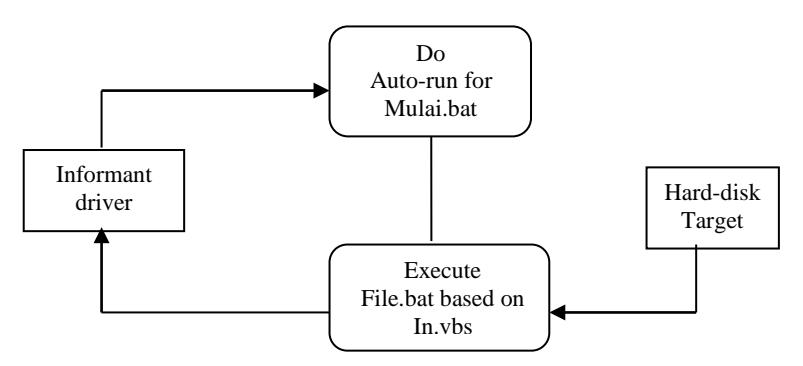
Figure 5 DFD Level 1 of the In-Out Module.
3.3 Content Module
The Content Module is one of the files transferred from the flash disk to the suspect's hard disk as a trap. Figure 6 shows DFD Level 1 of the Content Module. There are two applications to be prioritized from the contents of the module:
- 1) Admin-client LAN application an application that can provide remote access and file transfer between the administrator and client computers on a local area network. Examples are Stealth File Manager, StealthNet, TeamViewer, etc. The goal is to be able to continue the investigation remotely.
- 2) Keylogger application an application that performs logging on the client computer, such as ActualSpy, SpyAgent, etc. This application's role is to monitor and provide reports (logs) of activities carried out in the form of notes to the target's computer that will be taken through a file transfer from
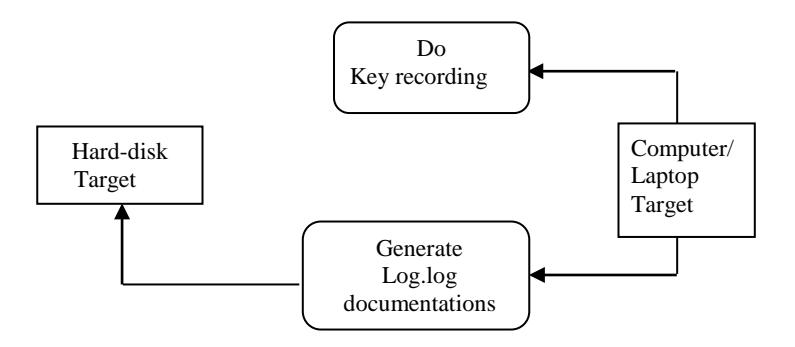
Figure 6 The DFD Level 1 of the Content Module.
The executable file of the keylogger will be copied to the root of drive C. If the target's laptop is an Asus then – in order to disguise the content modules – the keylogger will be named AsusAssist.exe. Documentation of the keylogging process is stored in a file named log.log.
4 Test Result and Analysis
The TSI system has been tested on two people who were used as a target. Note that the targets used in this test were friends of the authors and did not know that files on their computer were being targeted as an example of digital evidence to be taken. This was done to ensure that the test was as close as possible to a real-life situation. At the end of the test, the targets were informed of the test activity and all files that had been successfully obtained were restored, so that the ITE Law No. 11 of 2008 article 30 regarding the theft of digital files without rights was not violated. A specification of the targets is shown in Table 4. The storage medium used was a Seagate Go Flex (500 GB, USB 3.0) external hard disk.
The first injection was done on Sunday, 18.5.2014, with the same file.bat syntax for both targets. The second injection was done on Wednesday, 21.5.2014, with a different syntax, adjusted to the results of the first injection. Files that were attempted to take during this test were: the Windows Registry, Yahoo Messenger archives, the internet access history of Chrome and Firefox, as well as their cache and cookies, the My Documents folder, the My Pictures folder, and the Download folder from the computer or laptop using a Windows 7 operating system.
| Target | Mr. X, Apt. PT. BCD, Supervisor | Ms. Y Student of STEI ITB |
|---|---|---|
| Hardware Specifications | Acer Aspire One AMD C-50 dual core, 1.0 GHz | Asus U36 Intel i5 core, 2,3 GHz turbo |
| AMD Radeon HD 6250, 2 GB RAM HD 500 GB 5400 rpm Windows 7 Premium, 64-bit | boost up to 2,9 GHz, nVidia GeForce GT520, 4 GB RAM HD 720 GB 7200 rpm Windows 7 Ultimate, 64-bit |
Table 4 Hardware Specifications of Targets.
4.1 Procedure of Experiment
Testing was carried out in several steps, as described in Figure 4. In this experiment the investigator also acted as the informant who executed the twostep injection. Each step consists of a pre- and post-injection phase. The second injection is actually an iteration of the first injection. The difference is in the file.bat configuration, i.e. in the first injection it is set to plant the Content Module and take initial data, while the second injection is used for retrieving the results from the Content Module and collecting more data. Analysis of the data obtained from the first injection focuses on whether to use or not use certain functions of the TSI application and does not involve the contents of the personal files that were successfully retrieved. Therefore the TSI system configuration for the second injection is limited to taking the results of the contents from the Keylogger Module and taking other files than during the first injection phase.
4.2 First Injection's Testing Results
During the first injection testing two failures occurred as shown in Table 5. The first was the failure of autorun.inf to automatically start the TSI system due to antivirus protection blocking the autorun command. The solution was to manually execute the mulai.bat file. This is critical, because –although it can be done in a very short time–if the target becomes aware suspicion will arise.
The second failure was the failure to copy some of the Windows Registry files, namely UsrClass.dat, UsrClass.dat.LOG1 and UsrClass.dat.LOG2. These files are actually the core of the Windows Registry and contain all user data, including all of the applications that require a password to login, which means copying the Registry had failed, despite all the folders and other files from the Registry having been copied. To find the cause, the file.bat command was executed directly without in.vbs configuration, so that the command prompt and copying or cloning information were visible. It was found that the fileUsrClass.dat, UsrClass.dat.LOG1, and UsrClass.dat.LOG2 were running a file that was being opened and modified continuously by the Windows operating system. The solution is to use the batch file application Hobocopy.exe (http://github.com/candera). Hobocopy.exe is executed through a command from file.bat with the following syntax: hobocopy#UserProfile#\AppData\Local \Microsoft\Windows\#drive#\all\regcurrentuserUsrClass*.Dat.
Table 5 First Injection's Test Results.
| Parameter | Status | Information |
|---|---|---|
| Social Engineering | Succeeded | Used cover to copy movies from an old |
| Module | friend | |
| Autorun.inf | Failed | There was antivirus protection (AntiVir) on the first target's computer, which blocked autorun so mulai.bat had to be executed manually |
| Mulai.bat | Succeeded | File.bat successfully opened with the configuration of in.vbs |
| File.bat: | ||
| Installation of keylogger module contents and shortcuts | Succeeded | Keylogger renamed to AcerAssist.exe to eliminate suspicion from target and copied to the root of drive C |
| Copying Windows | Failed | Failed to copy important files like |
| Registry | UsrClass.dat, UsrClass.dat.LOG1, and UsrClass.dat.LOG2 | |
| Copying internet access history from Chrome and Firefox and copying from Yahoo Messenger | Succeeded | Copied internet access history from Google Chrome and Mozilla Firefox as well as with its cache and cookies successfully copied. Archived conversations from Yahoo Messenger were successfully copied |
| Cloning archive of folders My Downloads, My Documents and My Pictures | Succeeded | Successfully cloned all files like photos, videos, audio, Office documents, and other archives with all kinds of attributes without changing the attributes and metadata. The hidden files in the My Documents folder could be cloned perfectly. |
Apart from the mentioned failures, the rest of the copying and cloning process, installation of the Contents Module, copying history of Internet access from Firefox and Chrome, copying Yahoo Messenger archives and cloning the archives of the My Documents and My Pictures folders, were successfully executed. The most important was the successful cloning of the data so that the data can be used as valid evidence in court.
4.3 Second Injection's Testing Results
The second injection testing, in accordance with the same restrictions, was only aimed at complementing the deficiencies of the first injection, i.e. copying UsrClass.dat and cloning the keylogger results and office documents from drive D and E. An important aspect to be considered during the second injection is the aspect of accuracy of data captured. Therefore the file.bat configuration syntax for the second injection was as follows:
%kloning% "C:*" "%drive%\all" "log.log"
%kloning% "D:*" "%drive%\all\Ddoc" "*.docx"
%kloning% "E:*" "%drive%\all\Edoc" "*.docx
| Table 6 Second Injection's Test Results. |
|---|
| Parameter | Status | Information |
|---|---|---|
| Social Engineering Module | Succeeded | Using cover to copy movies from an old friend |
| Autorun.inf | Succeeded | Antivirus AntiVir has been turned off |
| Mulai.bat | Succeeded | File.bat successfully opened with the configuration of in.vbs |
| In.vbs | Succeeded | Managed to have file.bat executed by mulai.bat running as a process so that it becomes invisible |
| File.bat: copying running file UsrClass.dat | Succeeded | Hobocopy.exe was successfully executed through the use of a command in file.bat to copy running files |
| Cloning log.log from drive C | Succeeded | Log.log files successfully taken from the root of drive C of the target's laptop |
| Cloning files with .docx extension from drive D and drive E | Succeeded | All files with .docx extension successfully cloned. Cloning also yields important information about the folder composition on the target's computer. |
The results of the second injection test, is shown in Table 6 reached a success rate of 100%. The requirements of accuracy and functionality were fulfilled and the problems that occurred during the first injection were successfully fixed.
5 Conclusion
This paper proposes a new method for retrieval of digital evidence, which is suitable as a gateway for an initial investigation to take raw data and to pave the way for further investigation, including for surveillance purposes. The system, called Two-Step Injection (TSI), uses a cloning method that retains the original metadata and fulfills the chain of custody to provide evidence that is acceptable, original, complete and trustworthy. The first injection is the phase of planting the Content Module, collecting data and subsequently analyze failures (if any) in order to get important information for the second injection. While the second injection is an iteration of the first injection and is the phase of data harvesting from the Content Module and collecting more data. The method works covertly and can be combined with other digital evidence excavation applications that already exist, so that the accuracy and completeness of the resulting digital evidence can be improved.
An experiment in the real world with two targets was executed to test the system. The results showed that during the first injection phase some failures occurred; the success rate was about 75%. The second injection test improved performance and had a success rate of 100%. The requirements of accuracy and functionality were fulfilled and the problems that occurred during the first injection were successfully fixed. The experiment showed that the developed TSI system works properly.