

1 Introduction and Background
The use of smartphone technology, in particular mobile applications to substitute other mobile-guide technology in ecotourism areas, could eliminate some of the problems experienced by tourists during their visits, such as reducing the learning curve so they do not have to focus on device operability but can concentrate on the information provided by the smartphone app. This is an important criterion in the design of multimedia content for mobile applications. It has been proposed that tourists who use a smartphone app while visiting a cultural heritage site are more immersed than those not equipped with a smartphone app [1]. Many touristic attractions have successfully encouraged the usage of mobile devices such as smartphone apps to enhance their visitors'
experience before, during, and after their visit, be it for travel purposes [2-4], tourism branding [5,6], destination management [7,8], or smart tourism [4,6,9- 15] among others.
Dickinson et al. in [2] provided a good analysis of the usage of smartphone apps for tourism, in particular in the travel domain, while Gupta et al. in [16] identified the key factors in the adoption of smartphone apps in tourism, such as performance expectancy, perceived risk, perceived trust, and price savings. A smartphone app must be free from minor or major usability issues to provide a good user experience (UX).
The usability of mobile apps has been widely discussed in the literature using several different key criteria, for example: effectiveness [17,18], efficiency [19], satisfaction [19,20], learnability [21,22], memorability [20,23], and engagement [24,25]. Many of the smartphone apps that have been developed do not sufficiently emphasize certain aspects of design. The contents are not presented effectively to the user, which negatively impacts the user's interaction with the device [26,27]. Furthermore, some smartphone apps are designed in the same way as their Internet-based counterparts on web platforms, not considering the unique properties of the device (i.e. different screen sizes and resolutions, small input area) [26]. This contributes to information overload, too many site links and difficult navigation on mobile devices [28]. Therefore, users are confused and frustrated as the device does not conform to the main usability standards for smartphone apps, such as not using sufficiently large buttons to enable data entry, as the device layout is traded off for the accuracy of the information [29].
Usability evaluation focuses on the ease of use of mobile device features and determining whether users can execute their tasks successfully and efficiently. Dhouib et al. [30] analyzed various considerations from the literature in determining which usability evaluation methods (usability testing, heuristic evaluation, and cognitive walkthrough) are suitable for interactive adaptive systems. They further extended their results in the area of tourism in deciding the suitability of usability evaluation.
Usability evaluation methods are essential for system development to ensure its quality. HE is an evaluation method that focuses on evaluating an actual system or a prototype system carried out by experts. Although many previous studies have suggested that HE should be carried out by experts and not by actual users, in several studies, the evaluators were not only usability experts [31]. A detailed systematic analysis of related literature was conducted in [32]. It was discovered that of the 215 research articles analyzed, HE was used in articles, whereas user testing was used in 56 articles. In addition, it was found that 104 studies used a survey/questionnaire method. The analysis was conducted in all software
development domains. Therefore, it is important to examine the type of usability testing incorporated in developing a tourism application.
Recent research on tourism apps has mainly concentrated on usability testing (user evaluation) for users [33-38], while limited research efforts have applied HE in the design and development of smartphone apps [1,39]. Several researchers have demonstrated the benefits of HE in improving the UX [40-42]. Furthermore, no known research has adopted a specific heuristic for HE for ecotourism smartphone apps. Given the rapid proliferation of smartphone apps for tourism-related applications and the increasing importance of the UX, it is important to determine how this technology has been built to benefit visitors by ensuring that all relevant usability issues have been addressed before the app reaches the targeted users. This study had two objectives: (1) to concretize the need for incorporating HE into the design and development of ecotourism smartphone apps; (2) to determine the effectiveness of utilizing a specific heuristic for smartphones in HE to discover usability issues for ecotourism smartphone apps for further remediation.
2 Methodology
2.1 Design and Development of Niranur Agro Farm (NAF) App
This study used the Mobile Application Development Lifecycle (MADLC) as the framework for developing the Niranur Agro Farm (NAF) app. MADLC is designed for the development of a mobile application framework and comprises seven phases: (1) identification, (2) design, (3) development, (4) prototyping, (5) testing, (6) deployment, and (7) maintenance [43]. The researchers analyzed the current idea and design of the ecotourism-related smartphone app NAF in the first phase. Previous information on the architecture, design, features, and functions of ecotourism apps was gathered and used as a reference point for developing a new NAF app. In addition, the researchers made several visits (approximately two months) to the NAF to understand the issues/problems and how the smartphone app can be utilized to enhance the visitor's experience. An interview was held with the owner of the NAF to understand the activities and attractions of the NAF. This was important to ensure that the new NAF smartphone app would be fully utilized and positively impact the UX. In addition, a brief interview was conducted with five NAF visitors to understand their visitors' experiences and problems encountered during their visit. User comments and feedback were essential to ensure that the proposed NAF smartphone app would meet user expectations and specifications. It is important to involve users in the preliminary phase, as they may enhance the quality and functionality of the smartphone app. The contents of the smartphone app, particularly detailed information about bees and the method of producing honey, were gathered through other methods, e.g., web searching, document analysis, and expert review.
The user requirements and specifications from the first phase and related details gathered for the smartphone app were translated into an initial design of the app. Use case design and evolutionary prototyping were involved in this phase. The use case design involved the business design and the user's interaction with the system [44], while evolutionary prototyping involved designing and developing low-fidelity prototypes. Sketches in the form of storyboards were developed based on the user requirements obtained in the first phase. Figure 1 shows the initial storyboard design sketches for the NAF app. Subsequently, this was transformed into a GUI design for a better design and functionality of the proposed app, as illustrated in Figure 2.
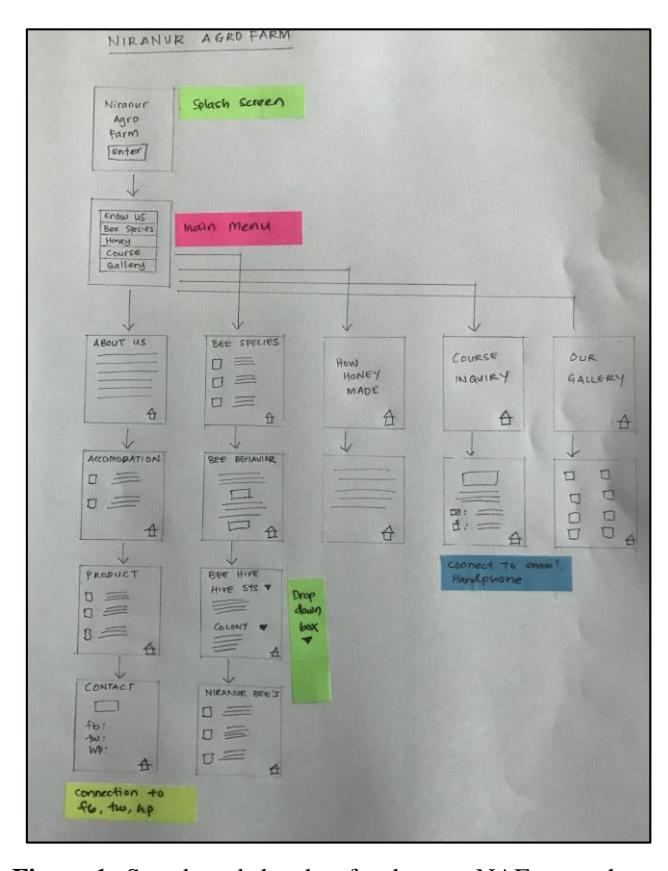
Figure 1 Storyboard sketches for the new NAF smartphone app.
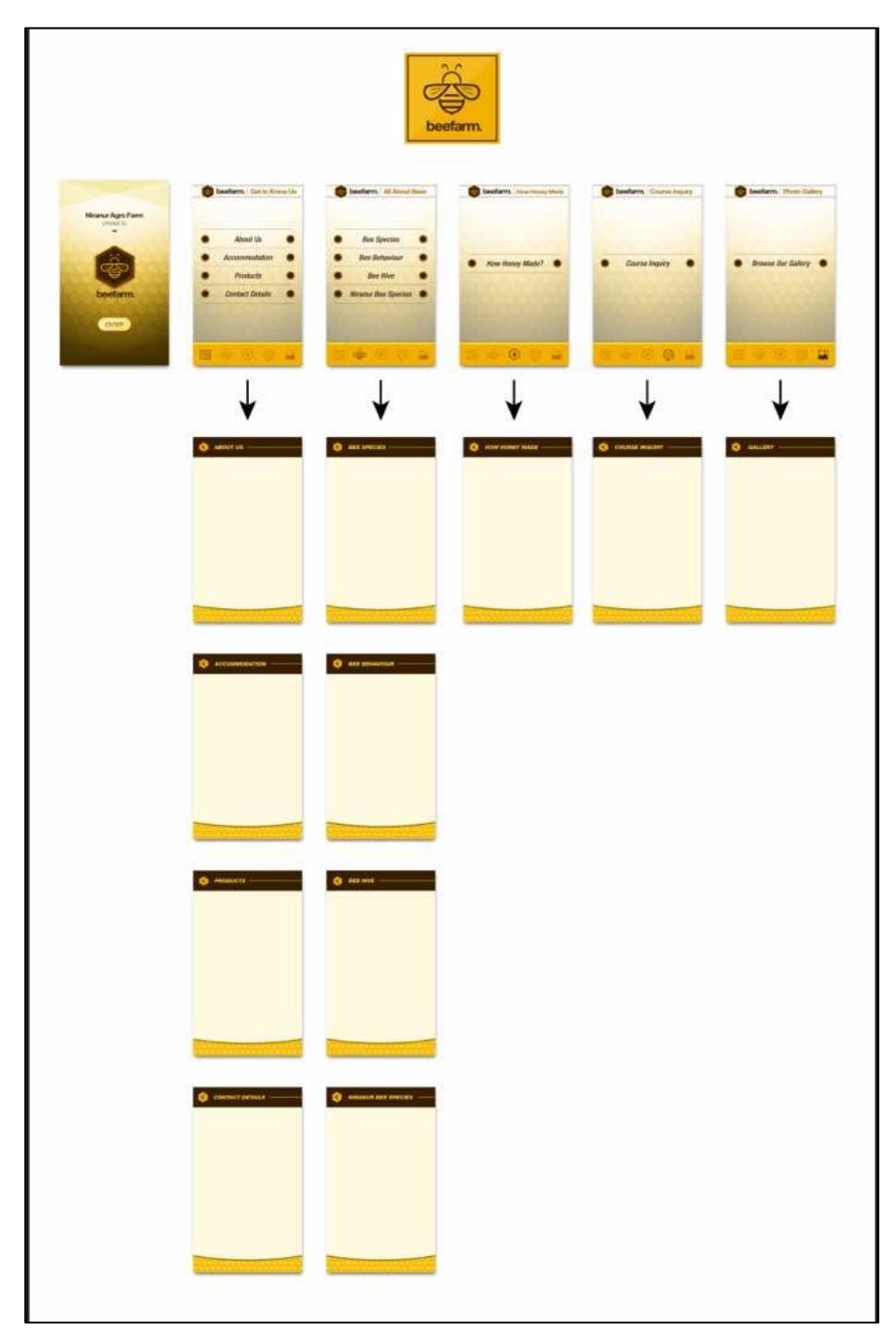
Figure 2 GUI design for the NAF smartphone app.
The conceptual design was coded for the functional requirements (core functionalities) and user interface (UI) during the development and prototyping phases. Several prototypes were built and subsequently improved based on input from the development team. The prototypes were tested using emulators/simulators provided by the SDK. Some issues were addressed and changes were rendered so further work could be carried out. The assessment of the application in the testing phase usually requires a real user to test the usability of the application. In this study, HE was first performed in the development process with eight human-computer interaction (HCI) experts before the app was evaluated with real users. All usability issues identified at this phase were rectified before the app was deployed to users. The purpose of performing HE before undertaking product usability testing was to resolve the usability issues.
2.2 Materials
2.2.1 NAF Smartphone App
The user is taken to the front-page of the NAF and then routed to the menu page when the app is launched, as shown in Figures 3 (a) and 3 (b) respectively. Users can click on the menu to select the details they need, such as the farm itself, the bee species, the products, the honey-making process, and others. If the user clicks on the bee species icon, they will be directed to a screen showing different bee species (Figure 4 (a)) and subsequently information on each bee species (Figure 4 (b)).
Figure 3 NAF front-page and menu page.
Figure 4 Information provided to the user.
Traditionally, Nielsen's heuristics is used to identify issues with interfaces, but in this study, SMART heuristics as proposed by Joyce and Lilley [52] was used as a guideline. A SMART heuristic is an evaluation tool and a guideline for the design of mobile applications. Although Nielsen's heuristics is a wellestablished tool and has been extensively used on different types of interfaces, previous researches [1,53,54] have found that Nielsen's heuristics is not appropriate for smartphone apps. Currently, there are various types of specific heuristic techniques available, for example, TMD heuristics [55], SMASH heuristics [56], mobile interface checklist [57], MATcH [58] and several other heuristics as mentioned by Salgado & Freire [59]. In this study, we used the SMART heuristics on a smartphone app based on the literature review.
The severity rating scale developed by Nielsen and Mack [60] was used to determine the severity of the usability issues identified. The scale consists of the following ratings: 0 = no usability at all, 1 = cosmetic problems (users will face minor problems; easily rectified); 2 = minor problems (users will face minor problems; should be fixed); 3 = major problems (users will have difficulty performing the task; should be fixed); 4 = catastrophic problems (users will have great difficulties in achieving their goals; must be fixed).
2.2.2 Participants
Eight experts, aged 20-35 years, consisting of 4 postgraduate HCI students and four university HCI lecturers were recruited to participate in this study. They were recruited based on their experience and expertise in usability tests, having conducted at least 10 HE before this study.
2.2.3 Procedure
All participants recruited in this study were asked to evaluate the NAF smartphone app individually. The analysis protocol used was as follows:
- 1. Recruitment: 8 expert participants were recruited.
- 2. Briefing: The participants were briefed about their involvement and role in the study and the evaluation processes. They were informed about the purpose of the NAF app and how it will be used at NAF.
- 3. Informed consent: An informed consent form was provided to all participants, which they were asked to complete before starting HE. They were allowed to withdraw and were not financially rewarded for their participation.
- 4. Evaluation: Participants were loaned a Huawei 3i smartphone with the NAF app installed. They were also given a pen and paper to document any usability issues, using the severity rating scale. They were asked to familiarize themselves with the NAF app before they conducted the evaluation. Subsequently, they were asked to identify any issues using SMART heuristics.
- 5. Debriefing session: The researcher thanked the participants for their participation and contribution.
3 Results and Discussion
The participants identified 22 usability issues with the NAF app. Table 1 shows the usability issues and their average severity ratings. Many of the usability issues were categorized as minor usability issues (17 issues) and a total of 4 usability issues were categorized as major issues. Only one issue was rated 4 (catastrophic) by the participants. Table 2 summarizes the usability issues based on the different heuristics. The inconsistencies of buttons and menus were the only issue that participants categorized as catastrophic and required immediate changes.
Figures 5(a) and 5(b) illustrate the issues and their solutions. Issues rated 3 for their severity and required improvements were: inconsistency in page scrolling, no appropriate link to the exit menu, and no link to contact details. Figures 6(a) and 6(b) depict the problem and solution of not having an appropriate link to the exit menu. Figures 7(a) and 7(b) depict the problem and solution, but there is no link to the contact information.
Issues Average Rating SMART Heuristic Inconsistent font size 2 S6 The paragraph is not aligned 2 S4 No link to contact details 3 S7 Name the image 1 S7 Inconsistent image 2 S9 Inappropriate link to the exit menu 3 S7 There is no auto tab 2 S4 The location map is not functioning 2 S11 Inconsistency in page scrolling 3 S6 Icons with text will work better 1 S11 Loading of the page too slow 2 S7 Inconsistent in a page exit 2 S6 The aesthetic design of the page is not appealing 2 S13 Inconsistency of buttons and menus 4 S13 Lack of icon use 3 S2 The proportion of photo size is not standardized 2 S2 Home button not relevant 1 S6 Grammatical error 1 S2
Word 'description' is not relevant 1 S6 Submenu button is not consistent 2 S2 Submenu is not relevant 2 S8 Inconsistent exit button for submenu 2 S2 Total Usability Issues 22/22
Table 1 Usability issues.
Table 2 Total of usability Issues based on the SMART heuristic.
| SMART Heuristic and its description | Total |
|---|---|
| SMART 3: Prevent errors where possible; assist user should an error occur | 5 |
| SMART 4: Display an overlay pointing out the main features when appropriate | 2 |
| or requested | |
| SMART 6: Design a visually pleasing interface | 5 |
| SMART 7: Intuitive interfaces make for easier user journeys | 4 |
| SMART 8: Design a clear navigable path to task completion | 1 |
| SMART 9: Allow configuration options and shortcuts | 1 |
| SMART 11: Facilitate easier input | 2 |
| SMART 13: Create aesthetic and identifiable icons | 2 |
| Total | 22 |
This study indicated that less than 0.05 per cent of the identified usability issues were rated as catastrophic, 18.7 per cent of the identified issues were rated as major and required changes, whereas in a previous study by Othman et al. [1], 19.35 per cent of identified usability issues were classified as catastrophic and 25.8 per cent of the usability issues were considered major. Although the percentage of catastrophic issues in this study was minimal, it
(a) issues (b) solutions
Figure 5 Inconsistencies of menus and buttons.
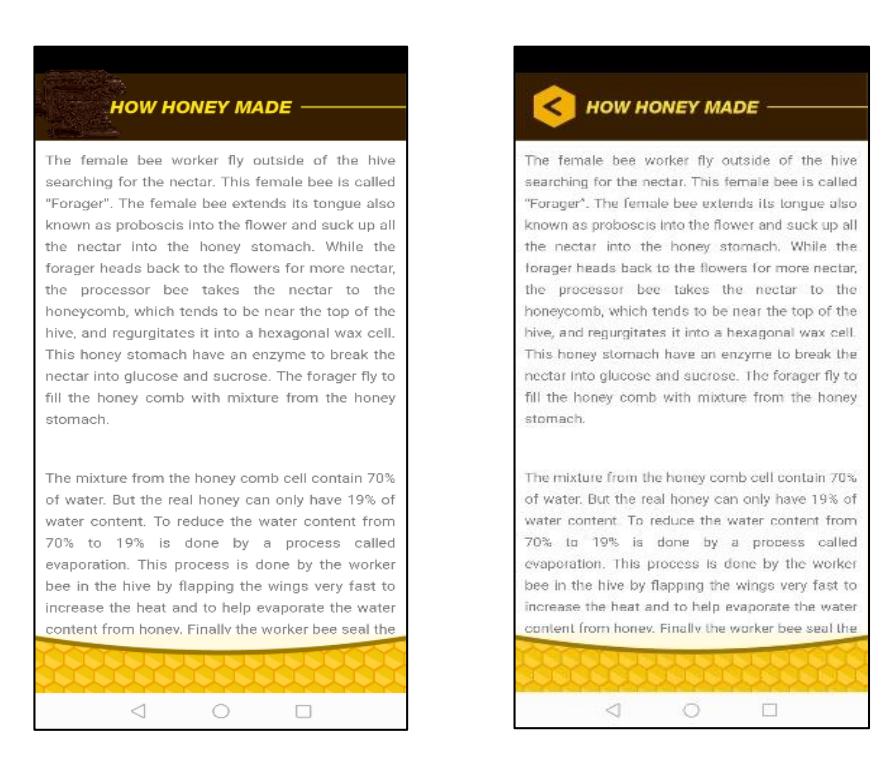
(a) issue – no back button (b) solution with back button
Figure 6 No appropriate link to the exit menu.
(a) issue – no link to contact details
(b) solution with contact details
Figure 7 No link to contact details.
is crucial to rectify them before the smartphone app is deployed to users. Furthermore, the major issues identified in this study required attention from the developers before the app reached the potential users. Additionally, the results from this study echoed previous findings on usability issues with mobile technology, particularly inappropriate design content and navigation [42, 45]. Design content and navigation are important aspects of ecotourism applications as they potentially impact the UX.
The highlighted issues identified in this study suggest that HE must be integrated into the design and development of ecotourism smartphone apps to ensure that users do not have difficulties when using the app. Participants in this study rated most usability issues using SMART 3 and SMART 6 heuristics. The importance of using a specific heuristic technique for smartphone applications, such as SMART heuristics, greatly helps the participants correctly map usability issues and eliminate difficulties in mapping heuristics, as mentioned in previous research [1]. One of the drawbacks in applying HE in the design and development of a smartphone app is the availability of experts. A previous study indicated that the findings obtained from non-experts were not reliable and that HE requires experts in the field [46]. However, other studies have opted for the use of novice evaluators [47-51].
4 Conclusion
In this study, we incorporated HE into the design and development of an ecotourism smartphone app. While most of the usability issues found in this study were minor, it did indicate that HE was indeed effective in identifying usability issues with the ecotourism smartphone app. This could potentially have a positive effect on the UX while using the app. Future studies will investigate whether positive or negative user experiences with the smartphone app at the ecotourism site were the result of the incorporation of HE in the design and development of the smartphone app. A parallel study on two different ecotourism sites should be conducted to compare the UX with the smartphone app built with or without HE integration.