

INFO ARTIKEL
Kata kunci:
etika digital, remaja awal, pola asuh, screen time, aplikasi mobile
ABSTRAK
COVID-19 telah menyebabkan pergeseran dalam dunia pendidikan, semula pembelajaran dilakukan secara luring menjadi daring, sehingga meningkatkan aktivitas remaja pada layar komputer atau gawai. Hal ini meningkatkan paparan terhadap konten yang tidak mendidik, sehingga memungkinkan terjadinya perundungan di dunia maya, lelucon, pornografi, dan hoaks. Orang tua memainkan peran penting dalam pengasuhan digital, yakni dengan memahami dan mengatur aktivitas digital. Aplikasi pengawasan orang tua sering digunakan orang tua untuk alasan keamanan. Untuk alasan tersebut, aplikasi pengawasan orang tua banyak digunakan orang tua dalam memantau penggunaan gawai. Penelitian ini bertujuan untuk mengidentifikasi pendekatan pola asuh dalam mengenalkan etika digital serta merancang aplikasi yang dapat mengakomodasi pola asuh digital untuk anak usia remaja awal. Perancangan fitur aplikasi didasarkan pada framework TOSS (Teen Online Safety Strategies). Hal ini mempertimbangkan keseimbangan antara parental control dengan self-moderation. Berdasarkan hasil evaluasi rancangan aplikasi Parentika terbukti sangat baik menurut pandangan orang tua berdasarkan skor SUS. Remaja awal merasa fitur yang ditawarkan non-intrusif bagi penggunaan gawai pribadi. Aplikasi Parentika mendorong orang tua berpartisipasi dan mengedukasi etika digital. Selain menjadi digital mentor, orang tua diharapkan dapat menjadi sosok teladan atau role-model bagi remaja awal.
Introduction
Children's curiosity to access the internet and social media in the age of technology has been difficult to contain. The presence of gadgets in the hands of children and adolescents has become commonplace. Based on the 2017 Survey of the Indonesian Internet Service Providers Association (APJII), as many as 143.26 million people, or 54.68 percent of the Indonesian population, use the Internet. The largest penetration of internet users is between the ages of 13 and 18 (75.50%) (KOMINFO, 2018). Especially with the pandemic situation, the teaching and learning process is carried out online. Parents provide gadgets so that children can learn online. This causes a spike in the screen time of children's and adolescents' gadgets, far from the recommendations from the American Academy of Child and Adolescent Psychiatry (6 hours duration) (Pandya & Lodha, 2021). Data from APJII (Association of Indonesian Internet Service Providers) in 2018 stated that adolescents and young adults aged 15–24 were recorded as having the highest number of social media users in Java (Lim et al., 2021). One of the reasons children and adolescents are interested in social media is because they have the flexibility to express their identity and also receive validation from the number of likes (Timeo et al., 2020). As well as being a place to stay connected at all times so you don't feel left out of information, commonly called FOMO (Hajirnis, 2015).
Parents' concerns about the negative risks of social media cannot be underestimated. The tendency of children to distance themselves from their parents when they already have access to personal devices fosters the mindset that gadgets are a realm of privacy that parents should not know about (Sampasa-Kanyinga et al., 2020). Actions such as blocking parents' accounts and using passwords on devices are feared to complicate communication between parents and children. Without the role of parents, there is often a pattern of imitation of what they see in digital media to look cool and get validation from their friends (Ananto et al., 2017). Unconsciously, there will be potential ethical violations such as offending and even attacking others (hate speech) through social media. The Indonesian Child Protection Commission (KPAI) stated that 22.4% of child victims of cyberbullying are suspected due to their high use of social media. In addition, the existence of a digital footprint can also cause damage to a person's image (Kusumastuti et al., 2021). Those are fundamental examples of how important ethics are on the internet.
According to Jenkins (Jenkins, 2009), there are three new challenges for parents in the digital age: the participation gap, the transparency problem, and the ethics challenge. Preventive steps that parents can take are to guide their children within the ethics of the internet (digital ethics). Digital ethics is the ability of individuals to consider managing ethics in cyberspace for the common good within society (Kusumastuti et al., 2021). In this case, parents have an important moral role to play in ensuring the safety of children in the context of using gadgets wisely and considering what they will do or share on social media. Digital ethics contains 1) the principle of netiquette; 2) basic knowledge to avoid exposure to negative content; 3) digital interactions under digital ethics rules and UU ITE (Electronic Information and Transactions Act); and 4) Basic knowledge of electronic transactions (Kusumastuti et al., 2021). The government, through KOMINFO, has made digital ethics one of the pillars of digital literacy. Digital literacy might be the answer to the challenges of the age of social media.
To face the challenges of the participation gap and transparency problem, every parent has a strategy to monitor their children's activities, especially most young mothers, or millennial moms, who, on average, spend about 8 hours working. Parents in the metropolitan area choose parental control technology in the form of mobile apps as a parenting tool (Wenerda & Sapanti, 2019). Based on Pew Research data, 16% of parents install parental control-based applications on devices used by their children. The use of the application is based on monitoring and limiting activities on devices that are judged to violate the rules (Alelyani et al., 2019).
Alelyani et al. (2019) found a contrast between parents and adolescents regarding the effectiveness of 52 parental control apps based on reviews on the Google Play Store. On average, parents give positive reviews, while children give negative reviews. Children feel that the app makes the relationship with their parents not good because some features are felt to be too stalking and restrictive, and there is no private space. Although some reviews also state how the app helps them manage their screen time while they are playing, it is necessary to find a balance between parental control and giving adolescents the responsibility to self-moderate.
Wisniewski et al. (2017) conducted a study of 75 existing Android parental control apps based on features. They create a framework of Teen Online Safety Strategies (TOSS) that conceptualizes the dichotomy between parental control and teen self-regulation in the context of adolescent online safety. Existing apps prioritize parental authority and teen safety over teen autonomy (Wisniewski et al., 2017). Hence, to design a parenting app, the designer needs to find a balance between parental control and self-moderation. The app will not only facilitate parenting interaction between parents but also balance the relationship between parental authority to carry out parenting with the need for the early adolescent practice of self-control. Through this study, an app was designed to help parents instill digital ethics and non-intrusive monitoring of their child's gadget use, as well as provide opportunities for early adolescents to practice self-control.
Method
The mobile application is designed using the Four Basic Activities of Interaction Design (Sharp et al., 2019). This method consists of:
Discovering Requirements
In this stage, quantitative and qualitative data on the behavior and needs of target users are needed to map the concept of interaction for mobile application design. Requirements include user personas that represent the figure of the mobile app user, a user experience concept based on the interaction that will occur, and a user interface design that can accommodate these problems.
Designing
The development of alternative designs is divided into conceptual design and concrete design. The conceptual design involves developing alternative designs that can illustrate how the application works. Concrete design focuses on developing the detailed aspects of user interaction with the product through the description of GUI elements consisting of colors, images, menu designs, and icon designs.
Prototyping
Interaction design produces interactive products that can be seen and felt by the target user. For this reason, before heading to the evaluation stage, it is required to have interactive products in the form of prototypes. Prototype forms are possible for both low-fidelity and high-fidelity prototypes.
Evaluating
Evaluation is a process to ensure the usability and acceptability of a design. In its development, interaction design, such as in applications, requires user involvement to increase the chances of product acceptance.
Figure 1 Four Basic Activities of Interaction Design (Source: Sharp et al., 2019)
Result and Discussion
Based on the four basic activities of the interaction design method, the following are the results of the application design stages:
Discovering Requirements
To find out the needs of potential users, data collection was carried out by distributing questionnaires to 50 respondents. The criteria for respondents were a father, mother, or guardian of early adolescence (10–14 years old). The questionnaire consists of 10 closed statements with alternative answers that have been provided. The first question contains the respondent's data. There is 1 question about the level of priority (ranking) and 8 questions in the form of a behavior scale that refers to the 5 points of the Likert scale: Strongly Disagree (1 point); Disagree (2 points); Neutral (3 points); Agree (4 points); Totally agree (5 points). The statements submitted to the respondent are as follows:
- 1. I allow children to access the internet.
- 2. I give the child full internet access to teach responsibility and self-control.
- 3. I agree to allow access on a specific day or time for moderate use.
- 4. I lend my gadget at a certain time with supervision.
- 5. In my opinion, it would be more effective to directly monitor children's digital interactions.
- 6. In my opinion, it would be more effective to use an app to monitor children's digital interactions.
- 7. I know digital ethics when I am interacting on the internet.
- 8. I have a hard time managing the parenting of early adolescents in the current digital age.
Table I Results Analysis of Total Assessment Score and Index Gain (%)
| Score | Q1 | Q2 | Q3 | Q4 | Q5 | Q6 | Q7 | Q8 |
|---|---|---|---|---|---|---|---|---|
| 5 | 55 | 40 | 95 | 90 | 105 | 70 | 90 | 50 |
| 4 | 80 | 64 | 84 | 76 | 80 | 88 | 92 | 56 |
| 3 | 39 | 33 | 21 | 24 | 24 | 27 | 21 | 51 |
| 2 | 6 | 18 | 4 | 6 | 2 | 10 | 4 | 10 |
| 1 | 3 | 6 | 1 | 2 | 0 | 0 | 0 | 4 |
| Total | 183 | 161 | 205 | 198 | 211 | 195 | 207 | 171 |
| INDEX (%) | 73.2% | 64.4% | 82.0% | 79.2% | 84.4% | 78.0% | 82.8% | 68.4% |
(Source: Personal documentation, 2022)
Then the index (%) data is interpreted based on the scoring interval of the Likert scale in Table II.
Table II Likert Scale Index and Scoring Intervals
| No | Index | Assessment | |
|---|---|---|---|
| 1 | 0 % - 20 % | Very Weak | |
| 2 | 21 % - 40 % | Weak | |
| 3 | 41 % - 60 % | Moderate | |
| 4 | 61 % - 80 % | Strong | |
| 5 | 81 % - 100 % | Very Strong | |
(Source: Widagdo et al., 2021)
It can be concluded that most parents of children in early adolescence allow their children to access the internet to exercise self-control. Parents moderate the child's gadgets usage, especially when they are accessing the internet. Some parents lend their gadget to be used with their children, and there are parents who give full access (a personal device) to their children. Parents' methods of monitoring digital interactions are more effective directly, but apps also have the potential to become parenting aids. In general, parents are aware of the importance of digital ethics. They felt the difficulty of facing the challenges of parenting early adolescents in the current digital era.
In the last question, respondents were asked to sort four aspects of digital ethics that were prioritized in the parenting of early adolescents. These data are obtained by the ranking method with the following assessments: 1st place (4 points), 2nd place (3 points), 3rd place (2 points), and 4th place (1 point).
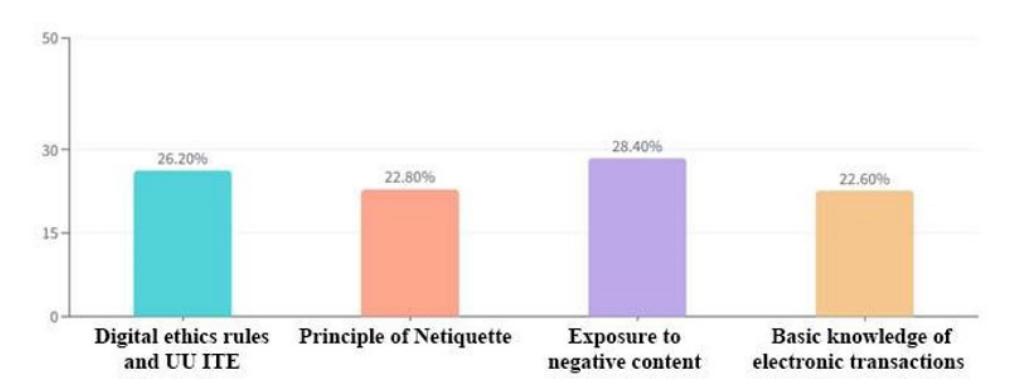
Figure 2 Result of parents ranking four aspects of digital ethics aspect (Source: Personal documentation, 2022)
The accumulation of ranking data (Figure 3) has identified that digital ethics priorities need to be introduced starting with (1) exposure to negative content (hoaxes, pornography, bullying); (2) digital ethics rules and UU ITE; (3) principles of netiquette; and (4) basic knowledge of electronic transactions. For this reason, the focus of the app's design is to raise awareness about children's exposure to negative content.
As supporting data, an interview process was held for three parents who had filled out the questionnaire. The goal is to find out how their digital parenting patterns (children's interaction with gadgets in the digital space) are applied to early adolescents (10–14 years old). From the summary of the interview, it can be concluded that the three participants were involved in a discussion with their children about the gadgets' playtime. The average given time is 1.5–2 hours per day. Children are only allowed to play on weekends. On school days (Monday to Thursday), the only time given is to do schoolwork, and screen time is limited. One participant used the Google Family Link app; other participants used a timer or wall clock to calculate screen time. Content that children often access includes Browser, Zoom, Tiktok, Instagram, WhatsApp, and Games (Roblox, Minecraft, and Mobile Legend). All participants
wanted to be role models for the child. Parents try to make rules that are not severely restrictive but still want their children to avoid harmful and inappropriate content for their age.
From these data, it was found that the demographic segmentation and behavior of potential users were formulated as two user-persona profiles, which are shown in Figure 4. Then build two user journey maps (the digital flow of early adolescent parenting), as presented in Figure 5.
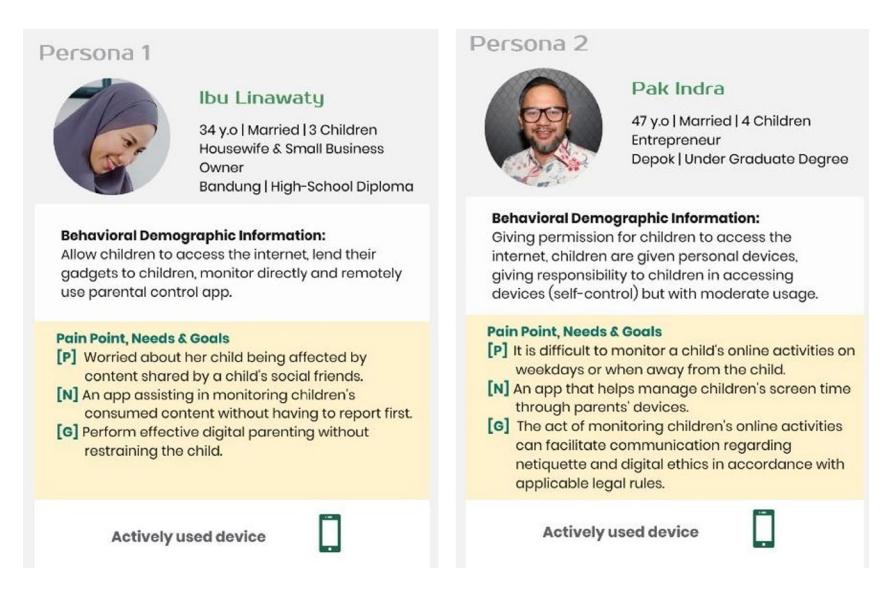
Figure 3 User-persona 1and 2
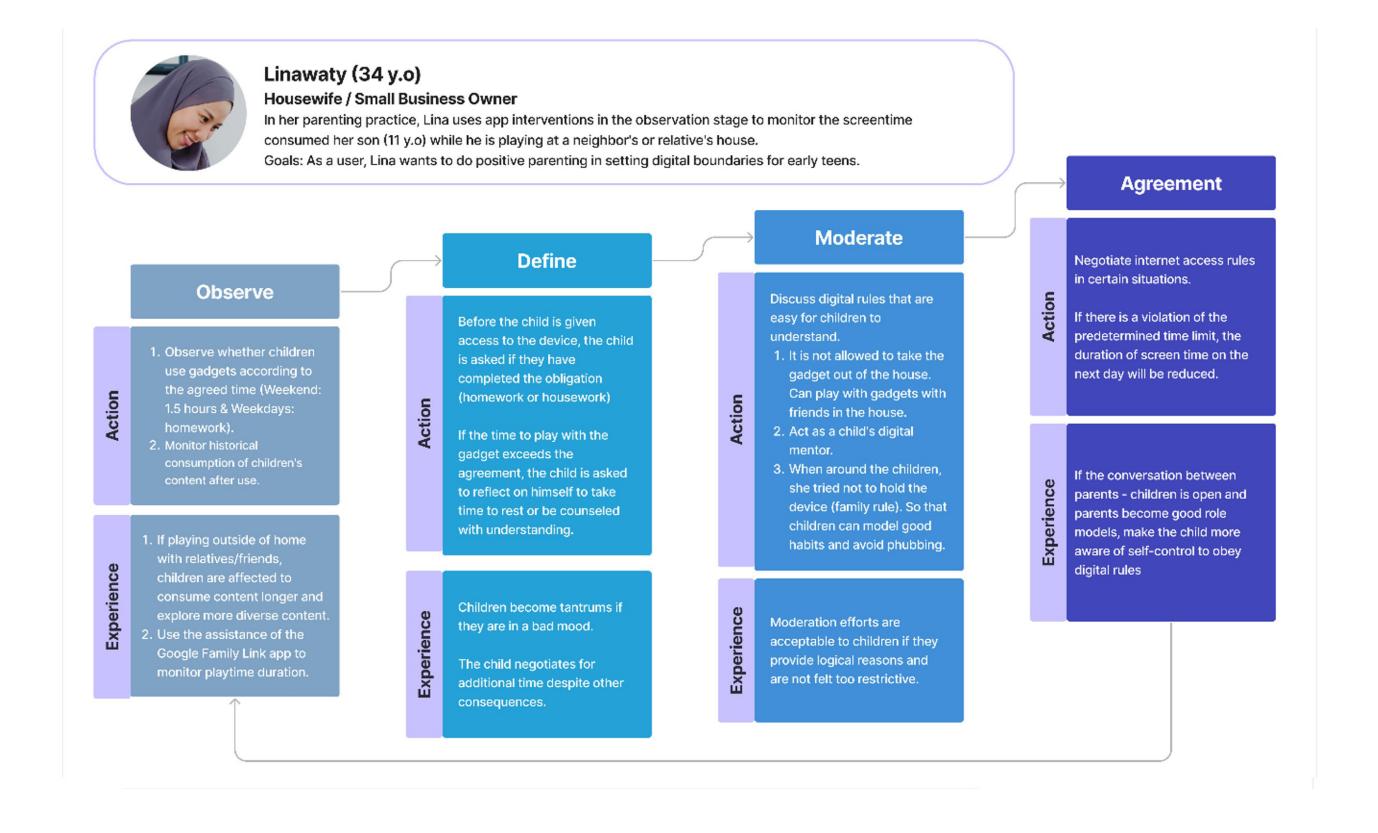
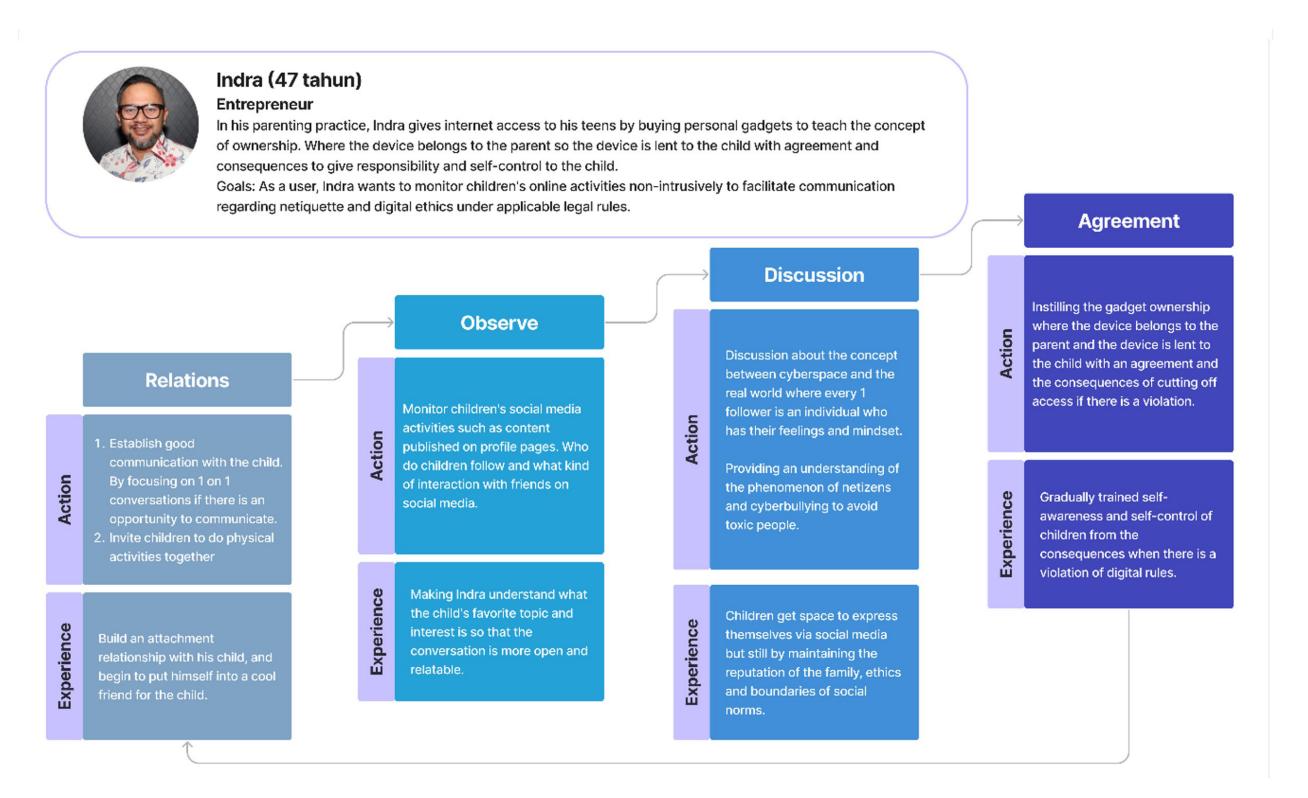
Figure 4 User Journey Maps (Source: Personal documentation, 2022)
According to those parenting scenarios, several key features will be applied as user experience (UX) concepts, such as (1) screen time management, (2) app monitoring on the child's devices, (3) content review, (4) restrictions on negative content, and (5) chat rooms. The concept of the user interface (UI) is going to be minimalist in style based on popular design guidelines such as Google's Material Design. Users in general can easily understand this interface style. During the initial phase of designing the prototype, blue was chosen as the dominant color based on overall user preferences.
Designing
The process of designing the mood board (Figure 5) begins with compiling a conceptual design in the form of a mood board that contains visual concepts, styles, colors, and typography that combine with each other to create a particular mood that is calm, friendly, and minimalist.
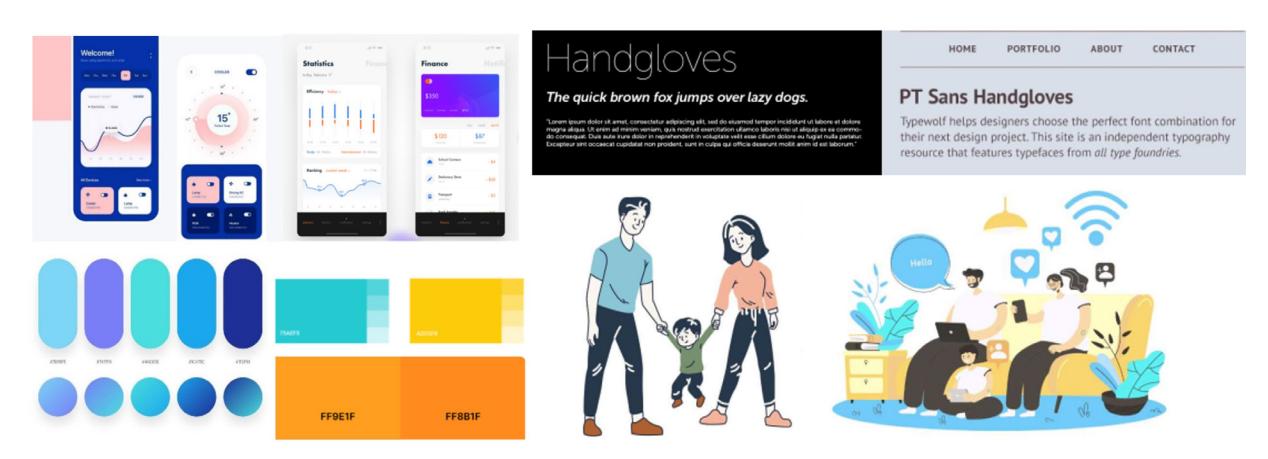
Figure 5 Mood Board Visualization (Source: dribbble.com, pinterest.com, images.google.com)
Followed by creating an Information Architecture (Figure 6), contains a flowchart of each information category that will be presented in the mobile app.
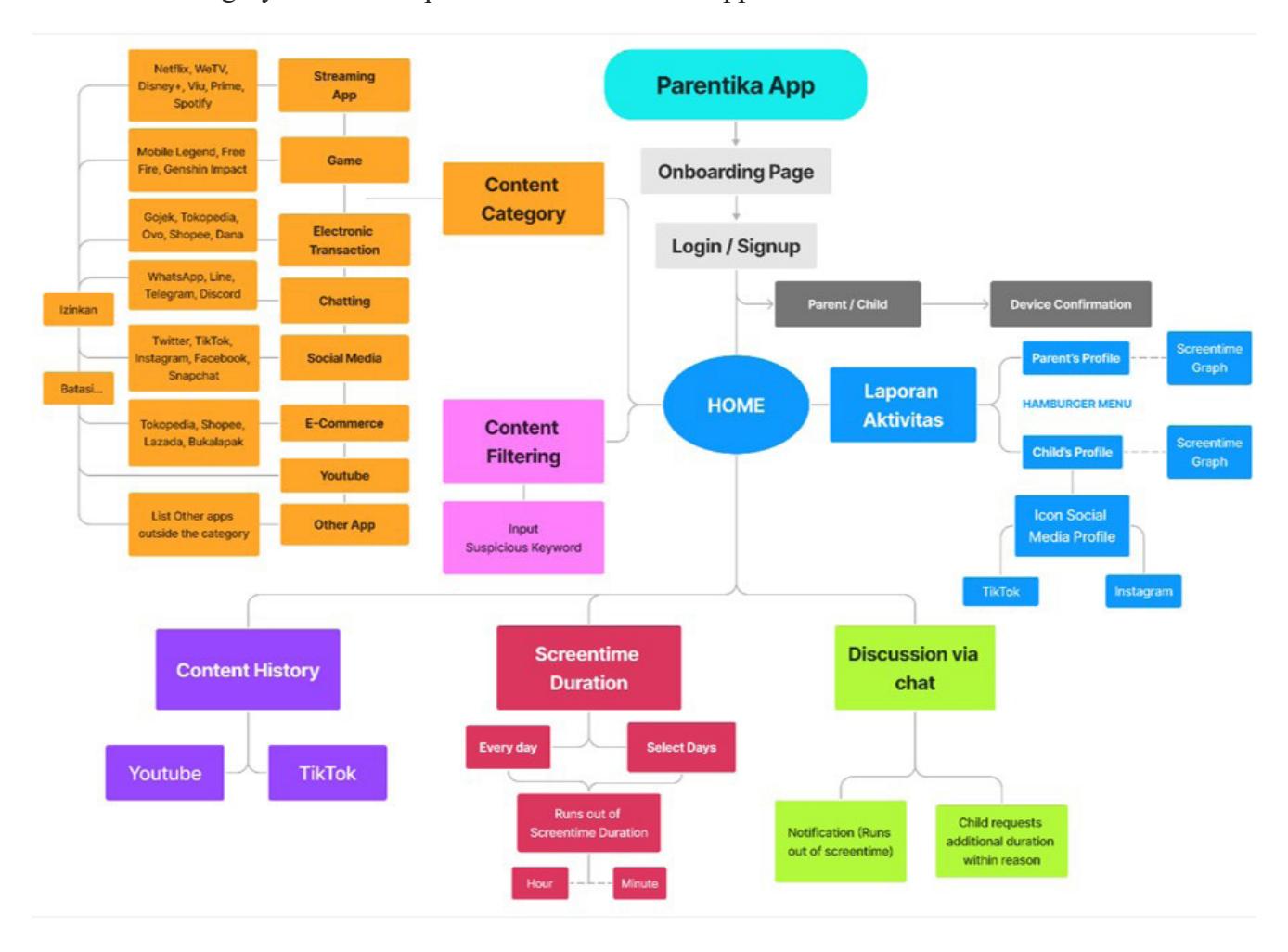
Figure 6 Information Architecture (Source: Personal documentation, 2022)
Concrete design results in a sketch of user interface design (wireframe) in Figure 7. Wireframes were formed by placing several elements inside a frame that was made simple.
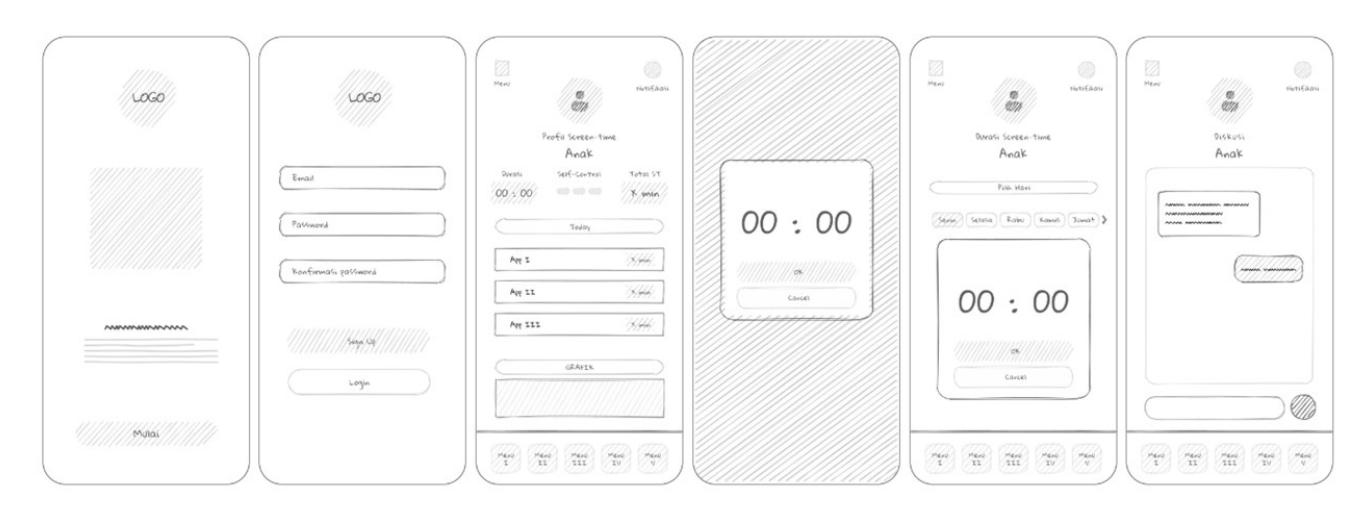
Figure 7 Wireframe (Source: Personal documentation, 2022)
Prototyping
Then the wireframe was developed into a low-fidelity prototype design of the Parentika app using Figma.
Figure 8 Low-fidelity prototype (Source: Personal documentation, 2022)
The low-fidelity prototype design is the basis for compiling three alternative designs in the following Figure 9.
Figure 9 Alternative designs (Source: Personal documentation, 2022)
High-fidelity prototypes are designed with Figma to achieve interaction functionality as close as possible to a mobile app. This design is based on an evaluation obtained from five practitioners in the field of mobile apps. A design iteration is carried out to create all the interface elements and produce an interactive prototype.
Table III User Interface Elements of Parentika App
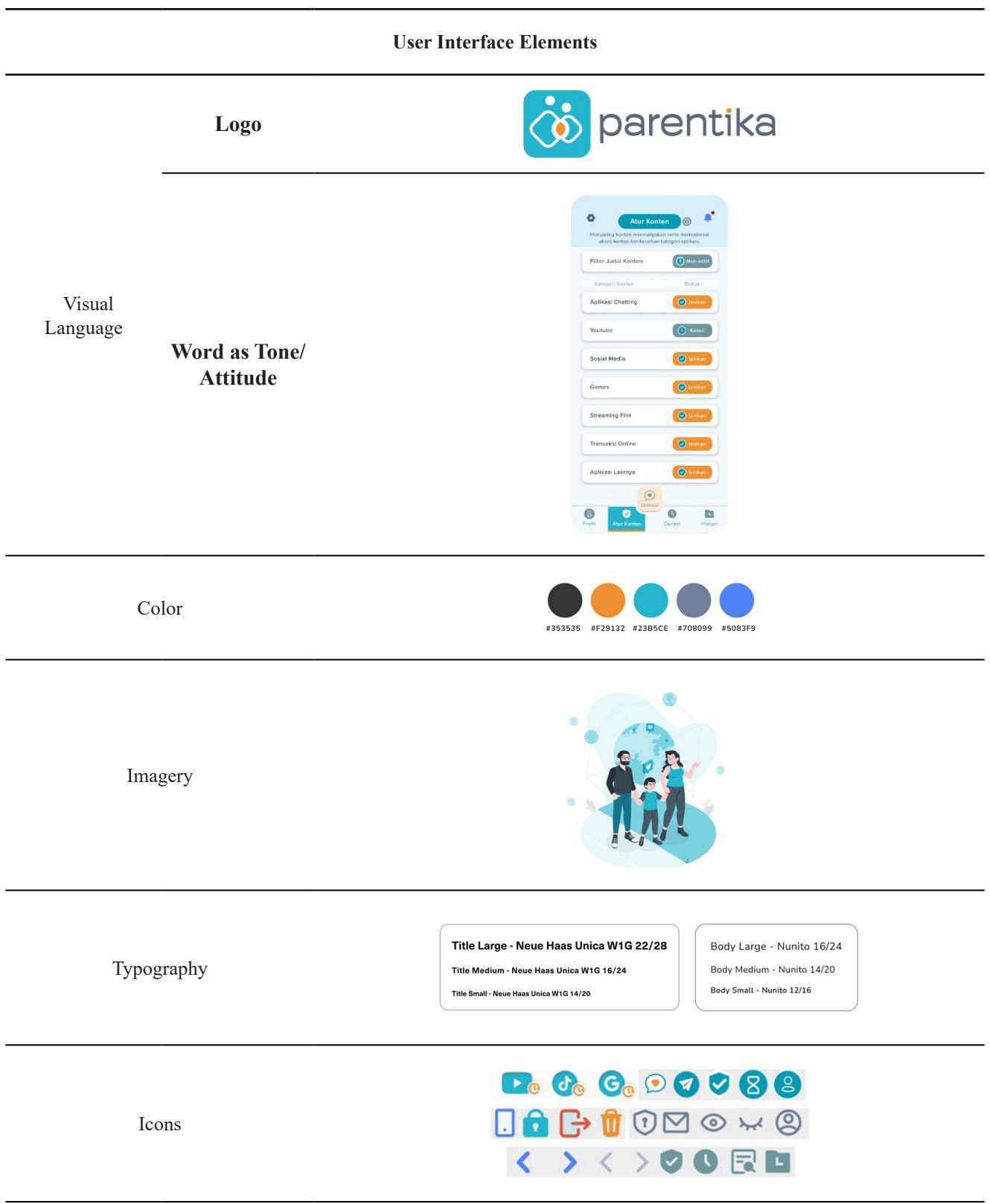
The Parentika app starts from the splash screen, then goes to the boarding page in Figure 10 as an introduction to the app overview and features that exist for new users. New users will be prompted to register an account.
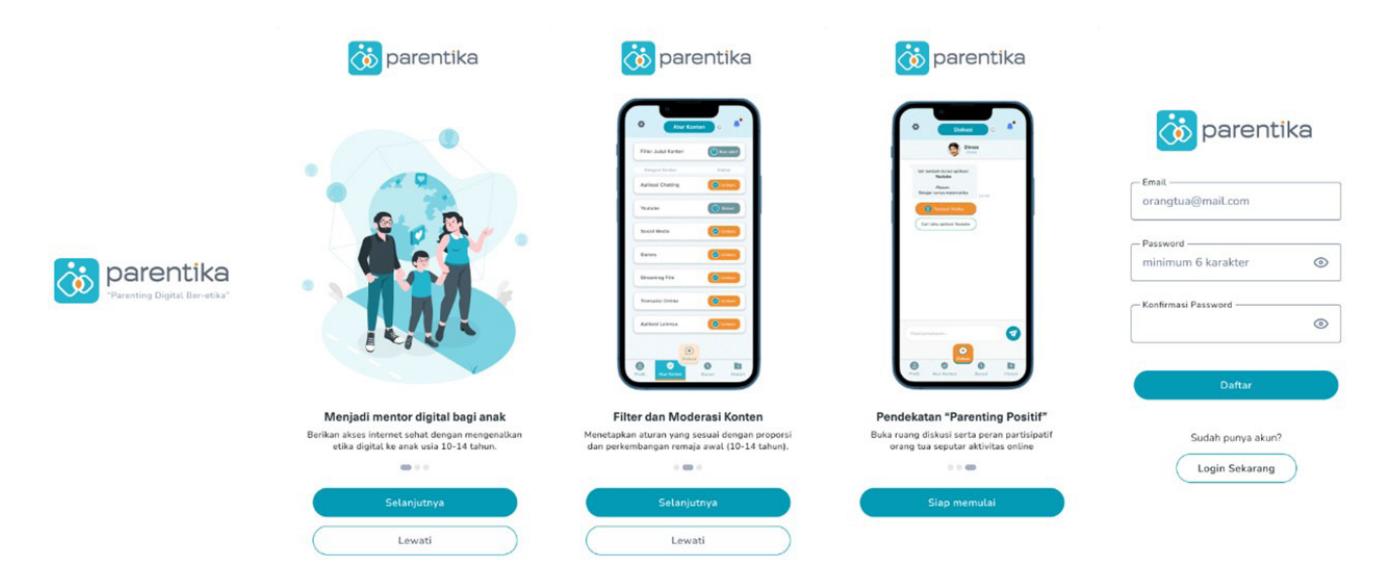
Figure 10 App orientation pages
After a successful login, the user is prompted to define a scenario (Figure 11). The first question is choosing ownership of the device. The second question is whether it is shared with the child or children who owns/own the device. The child's profile page contains children profile picture, name, and social media username, and then sets their daily screen time duration.
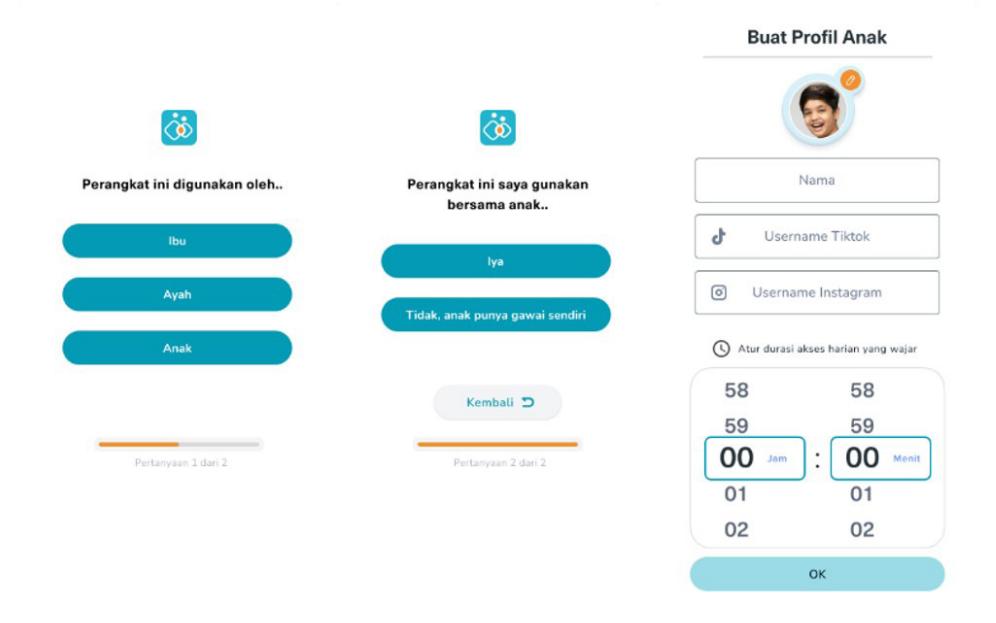
Figure 11 Selecting scenarios and filling in child's profile
The child's and parent's profiles (Figure 12) contain the history of apps accessed over a period of time. Users can view daily screen time charts for a certain time span.
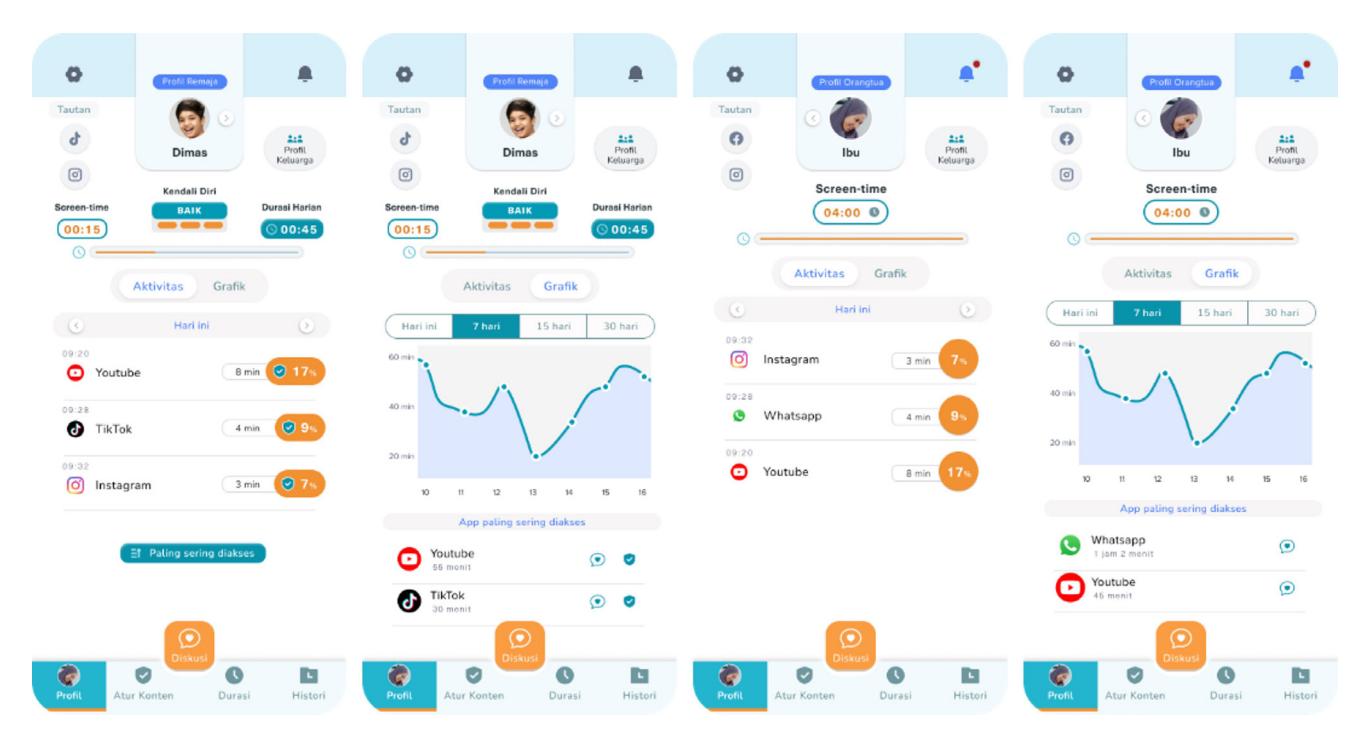
Figure 12 User profiles (Parent and Child)
Each family member's profile can be viewed on the hamburger menu (Figure 13). If the user wants to add a new device, they can connect by following the guidelines.
Figure 13 Family profiles and new device guide page
The two main features offered in the Parentika app are found in the content manager menu (Atur Konten), namely content moderation and content filters (Figure 14). Content moderation gives parents the control to determine the duration of accessing certain applications, such as social media. Content filters serve to notify parents of every malicious word that appears when a child sees content on the internet. Other features include setting screen time and customizing certain days.
Figure 14 Content moderation, content filters and setting screen time
Other features of the parent application are the history menu and the discussion/chat room (Figure 15). The history menu contains the child's content consumption history in the form of TikTok and YouTube video titles and Google searches. The total time children spend consuming video content is also recorded. Discussion and chat rooms are a feature for children who already have their own devices. Children can request additional time for necessary apps. Parents and children can discuss digital content on the chat page.
Figure 15 History menu, chat room, notification page and account setting
Evaluating
The evaluation process involved 14 participants with early adolescent (10–14 years old) parents. The testing begins by asking the user to perform several specific tasks on the prototype with their device using the link provided. Then the researcher can analyze the interaction of participants with the application using usability testing sites. Participants were asked to express their opinions after testing the Parentika app. The usability testing data concluded that the average participant felt it was easy to operate the app and that all of the menus functioned properly. Many participants want to use the app again to improve their parenting practices. Some participants felt the need to get used to it before using this application.
However, the UI and icon appearance of the Parentika app are easy to recognize and consistent. Through the System Usability Scale analysis method, the result is that the average value of the SUS score obtained by the Parentica app is 80.36. That score can be interpreted as meaning that the app's system is categorized as Acceptability Ranges: Acceptable; Grading Scale: A-; Adjective Rating: Excellent; Percentile: Above Average.
Conclusion
Parental control technology can facilitate current parenting practices. However, there is a need to be more open and give space for discussion both physically and digitally between parents and children, especially in the early adolescent stage. Parental involvement is also required in parenting apps. Parents should not become authoritarian figures but instead, be role models for early teens. With the Parentika app, it is hoped that parents will be assisted in parenting their child's digital interaction through an authoritative parenting approach to train, especially early adolescents who will become adults who have good selfcontrol in their daily lives. The Parentika App prototype can be accessed at s.id/Parentika.
Acknowledgement
The article is part of the Master of Design study at FSRD ITB. The author would like to express gratitude towards Kementerian Pendidikan, Kebudayaan, Riset, dan Teknologi for providing the "Beasiswa Unggulan" scholarship program. Thanks to Achmad Syarief, S.Sn., M.Sc., Ph.D., as writing and thesis supervisor as well as Yani Suryani, S.S., M. Hum., and Hafiz Aziz Ahmad, S.Sn., M. Des., Ph.D., for direction and correction in the process of writing this paper.
References
- Alelyani, T., Ghosh, A. K., Moralez, L., Guha, S., & Wisniewski, P. (2019). Examining Parent Versus Child Reviews of Parental Control Apps on Google Play. In G. Meiselwitz (Ed.), Social Computing and Social Media. Communication and Social Communities (pp. 3–21). Springer International Publishing. https://doi.org/10.1007/978-3-030-21905-5_1
- Ananto, D., Hartanto, D. D., & Sylvia, M. (2017). Perancangan Kampanye Sosial Bagi Orang Tua Tentang Pentingnya Anak Beretika Di Media Digital [Journal:eArticle, Universitas Kristen Petra]. In Jurnal Desain Komunikasi Visual Adiwarna (Vol. 1, p. 82381). https://e-resources.perpusnas. go.id:2119/id/publications/82381/
- Hajirnis, A. (2015). Social media networking: Parent guidance required. The Brown University Child and Adolescent Behavior Letter, 31(12), 1–7. https://doi.org/10.1002/cbl.30086
- Jenkins, H. (2009). Confronting the Challenges of Participatory Culture: Media Education for the 21st Century. The MIT Press. https://library.oapen.org/handle/20.500.12657/26083
- KOMINFO, P. (2018, July 23). Kecanduan Gawai Ancam Anak-anak. Website Resmi Kementerian Komunikasi Dan Informatika RI. http:///content/detail/13547/kecanduan-gawai-ancam-anakanak/0/sorotan_media
- Kusumastuti, F., Santi Indra Astuti, Yanti Dwi Astuti, Mario Antonius Birowo, Lisa Esti Puji Hartanti, Ni Made Ras Amanda, & Novi Kurnia. (2021, April 16). Modul Etis Bermedia Digital. Literasi Digital. https://literasidigital.id/books/modul-etis-bermedia-digital/
- Lim, R. P., Purnomo, D., & Sari, D. K. (2021). Pengaruh Pengguna Instagram terhadap Kesehatan Mental Instagramxiety pada Remaja di Kota Salatiga. Komuniti : Jurnal Komunikasi dan Teknologi Informasi, 13(1), Article 1. https://doi.org/10.23917/komuniti.v13i1.13757
- Pandya, A., & Lodha, P. (2021). Social Connectedness, Excessive Screen Time During COVID-19 and Mental Health: A Review of Current Evidence. Frontiers in Human Dynamics, 3. https://www. frontiersin.org/article/10.3389/fhumd.2021.684137
- Sampasa-Kanyinga, H., Goldfield, G. S., Kingsbury, M., Clayborne, Z., & Colman, I. (2020). Social media use and parent–child relationship: A cross-sectional study of adolescents. Journal of Community Psychology, 48(3), 793–803. https://doi.org/10.1002/jcop.22293
- Sharp, H., Preece, J., & Rogers, Y. (2019). Interaction Design (5e ed.). John Wiley and Sons.
- Timeo, S., Riva, P., & Paladino, M. P. (2020). Being liked or not being liked: A study on social-media exclusion in a preadolescent population. Journal of Adolescence, 80(C), 173–181. https://doi. org/10.1016/j.adolescence.2020.02.010
- Wenerda, I., & Sapanti, I. (2019). Literasi Digital bagi Millenial Moms. Penerbit Samudra Biru. https:// literasidigital.id/books/literasi-digital-for-millenial-moms/
- Widagdo, B. W., Handayani, M., & Suharto, A. (2021). Dampak Pandemi COVID-19 Terhadap Perilaku Peserta Didik Pada Proses Pembelajaran Daring Menggunakan Metode Pengukuran Skala Likert. Jurnal ESIT (E-Bisnis, Sistem Informasi, Teknologi Informasi), 15(2), Article 2. http://openjournal. unpam.ac.id/index.php/ESIT/article/view/13062
- Wisniewski, P., Ghosh, A. K., Xu, H., Rosson, M. B., & Carroll, J. M. (2017). Parental Control vs. Teen Self-Regulation: Is there a middle ground for mobile online safety? Proceedings of the 2017 ACM Conference on Computer Supported Cooperative Work and Social Computing, 51–69. https://doi. org/10.1145/2998181.2998352