

INFO ARTIKEL
Kata kunci:
desain antarmuka pengguna, kekerasan seksual, desain thinking, aplikasi
ABSTRAK
Sejak tahun 2015 hingga tahun 2022 terjadi lonjakan angka kekerasan seksual di lingkungan pendidikan. Berdasarkan data yang dihimpun dari SIMFONI PPA (Sistem Informasi Online Perlindungan Perempuan dan Anak) tercatat sekitar 21.000 korban kekerasan seksual di lingkungan pendidikan pada 2022. Kekerasan tersebut terjadi juga di ranah perguruan tinggi, lebih mirisnya lagi penanganan kekerasan seksual di perguruan tinggi masih menggunakan cara manual hingga proses yang dilakukan berbelit-belit, sehingga jarang sekali korban yang melapor akibat rumitnya pelaporan dan lambatnya proses penanganan. Berdasarkan permasalahan itu, diperlukan tindakan untuk mengatasi masalah tersebut, salah satunya dengan merancang aplikasi sebagai media penanganan kekerasan seksual. Tujuan penelitian ini adalah merancang aplikasi antarmuka pengguna sebagai media penanganan kekerasan seksual di perguruan tinggi di Indonesia dengan menggunakan metode design thinking. Subjek yang terlibat adalah sivitas akademika IT Telkom Purwokerto sebagai sampel. Dalam pengujian tersebut, diperoleh hasil desain aplikasi yang dibuat dapat membantu mengakomodasi kebutuhan korban dalam proses penanganan kekerasan seksual. Desain tersebut diharapkan dapat menjadi cetak biru untuk menangani kekerasan seksual di perguruan tinggi.
Introduction
Since 2015 until 2022, there has been a surge in sexual violence cases in higher education institutions. Based on data compiled from SIMFONI PPA (Online Information System for the Protection of Women and Children), there were 8,216 cases of sexual violence in 2020. This number continued to rise to 10,328 cases in 2021 (Arethusa, 2022). According to Siti Aminah Tardi, Commissioner of the National Commission on Violence Against Women (Komnas Perempuan), from 2015 to 2021, there were 67 cases of violence against women in the education sector. This violence consisted of sexual harassment (87.91%), discrimination, and psychological violence (8.8%), followed by physical violence (1.1%) (Andriansyah, 2022). Among these 67 cases, higher education institutions ranked first as the largest contributor to violence, with a total of 35 cases, predominantly involving sexual violence.
Meanwhile, in higher education, sexual violence is still handled conventionally, especially at IT Telkom Purwokerto. Based on the results of an interview with Dadiek Pranindito S.T., M.T., the head of the IT Telkom Purwokerto P3KS Task Force conducted on Friday, November 18, 2022, at 10 a.m., it was said that since 2021, IT Telkom Purwokerto still uses conventional methods to deal with sexual violence, such as reporting cases using manual forms. Victims must contact the Task Force via email or WhatsApp, and the Task Force will recommend someone to help victims. This method has disadvantages because victims must use email or Whatsapp to report cases and get forms, cannot track cases in real-time, and cannot get help handling cases. Victims do not have the freedom to choose or determine whether the Task Force will become an assistant. It makes victims struggle harder to get an address and seek justice.
On the other hand, victims are vulnerable because they have been traumatized, have trust issues with others, are afraid to report cases, and feel alone. In addition, conventional methods are ineffective because perpetrators have more power than victims and often abuse that power (Andriansyah, 2022). The existence of power makes perpetrators dare to commit sexual violence and use that power as a shield to threaten victims, which makes victims afraid to speak up.
Based on the above cases, it is necessary to prevent and handle sexual violence. These efforts can be carried out by implementing strategies to prevent and handle sexual violence as stipulated in the Law on Sexual Violence (TPKS Law) Number 12 of 2022 (Kementerian Pemberdayaan Perempuan dan Perlindungan Anak, 2022). Prevention strategies are listed in Article 5, paragraph (2), regarding the prevention of sexual violence in the field of education, and in Article 7, paragraph (1), letter b, regarding building an integrated security system in the environment. Also, handling strategies are listed in Article 23, paragraphs (1) and (2) regarding the victim's right to overall information and handling results, legal assistance, psychological strengthening, the right to services according to the specific needs of victims, and periodic monitoring.
Strategies to prevent and address this can be realized through applications. The use of applications as a medium to avoid and deal with sexual violence was chosen because applications can accommodate things that other media cannot handle such as movies, public service advertisements, infographics, and posters. In contrast, these media can only serve the prevention side (Pratama, 2020). App as media can accommodate needs such as case reporting, education about sexual violence, connection with other users, contact with psychologists, and so on. The application media is adapted to the strategies to prevent and deal with sexual violence, as mentioned in the TPKS Law. Strategies for prevention can be realized through educational features and an integrated security system to minimize sexual violence. The approach to dealing with sexual violence is to create a complaint feature, victim assistance, and regular monitoring. This idea is supported by the IT Telkom Purwokerto Sexual Violence Prevention, Handling, and Bullying (P3KS) Task Force because the application can track data in real-time, quickly report cases, record events systematically, and facilitate integration with stakeholders. The application can be a valuable tool for the Task Force and victims to handle the case.
This application requires a user interface design to connect the application and the user so that the interaction between them can be done quickly (Lael, Mayasari, & Prihandani, 2021). The user interface
design is made to accentuate aesthetics and make users feel comfortable when using the application. The app is named "Saling Lindungi." This name was chosen because the way this app works is by using the collective security of users to protect each other. This application will be integrated with the IT Telkom Purwokerto P3KS Task Force.
Gajah Mada University previously made an application designed to handle sexual violence in higher education called the "Wonder" Application. The Wonder application is an emergency application that helps victims deal with cases of sexual violence. This application was created because cases of sexual violence against students while conducting community service programs have increased (Agung, 2019). However, this application is only focused on handling cases. Therefore, the user interface design of the Saling Lindungi app, which is focused on prevention and case handling, has become a differentiation from other existing apps.
This research aims to design an application user interface as a medium to prevent and handle sexual violence at IT Telkom Purwokerto using the design thinking method. The participating subjects are the academic community at IT Telkom Purwokerto. In addition, the stakeholders involved were the P3KS Task Force of IT Telkom Purwokerto. This application prototype is expected to be a guideline on how to deal with sexual violence in higher education.
Method
Design thinking is a design method that solves problems by understanding user needs. Users are involved in providing feedback on the design that has been created. In the design thinking method, there are five steps: empathize, define, ideate, prototype, and test (Brown, 2009). The five steps of design thinking can be explained as follows:
1. Empathize
Empathize is a step towards approaching the user to gather information and find out what the user needs. This approach is done by observing and involving users and trying to feel what users feel about the problems they face.
2. Define
Define is a step in identifying problems. This step is done by analyzing the needs and concerns that users have with the list that has been made about user needs, then looking for solutions. In the definition step, use affinity diagrams to analyze user needs. Affinity diagrams are a helpful method in brainstorming, organizing, and sorting data using diagrams. In this step, data and problems have been sorted and organized to find solutions.
3. Ideate
Ideate is a step in collecting ideas to solve the problems that have been identified in the definition step. In this step, ideas are also tested with low fidelity to see alternative solutions. For the user interface design of the Saling Lindungi app, the ideation step has been carried out with processes such as creating user flows, wireframes, and user interface guides as answers to the problems that have been sorted out in the definition step.
4. Prototype
A prototype is a step to visualize user interface design ideas. In this step, visualization is done based on the user flow, wireframes, and user interface guidelines that have been created in the ideation step. The interface design is created using Figma. Then, the design will be integrated with the prototype feature in Figma so that users can use the application.
5. Test
This step aims to test the prototype to see if it has run correctly or needs to be evaluated. The testing method used is usability testing. Usability testing is a method to measure a design by looking at the number of successful users when using the prototype design. Testing has been done online and offline. Online testing is done using the Useberry application to find heat maps for users. Heatmap is a feature on the Useberry app that tracks users' clicks as they use the design. Offline testing has been conducted to collect qualitative feedback data.
Result and Discussion
1. Empathize
The first step in designing a user interface using the design thinking method is to carry out the empathize step. The empathize step is done through interviews with potential users by considering their point of view toward knowledge of their wants, needs, and goals. This step is essential to ensuring that the design created can truly accommodate the needs of users.
The techniques used in the empathy step are different from the interview techniques used by journalists. In the empathy step, the interviewer cannot take a position, judge the user, blame, correct, or lead an opinion. The interview is conducted by letting the users pour out their thoughts, knowledge, feelings, and viewpoints. These things are done so that the answers from users are pure and without bias from the interviewer.
User interviews were conducted with six samples, consisting of three male and female users, each of whose identities were kept confidential. Interviews were also conducted with the IT Telkom Purwokerto P3KS Task Force to collect data from a stakeholder perspective. Table I shows the results of interviews with users, which are represented by several points.
Table I The Result of User Interview and IT Telkom Purwokerto P3KS Task Force
| Users | IT Telkom Purwokerto P3KS Task Force |
|---|---|
| Need to learn how to report a case and need to know where to report it. | The victims are often confused in reporting cases |
| Did not know about the P3KS IT Telkom Purwokerto Task | The victims were scared to report cases because they are |
| Force. | afraid the privation has been threatened. |
| Need assistance from lecturers, psychologists, and | The victims are afraid to recount the incident because of the |
| lawyers. | traumatic memories may emerge |
| Want to be able to choose a task force or lecturer who accompanies during the reporting and counselling process | The preparator is usually the same person |
| Identity does not want to be known when reporting | The preparator conducted repeat violence against the |
| (anonymous) | different victim |
| Want to report if their privacy is guaranteed | The victims have difficulty to report due to lack of evidence |
| The reporting procedure to the P3KS IT Telkom | The several preparators don't know what they conducted |
| Purwokerto Task Force still uses manual methods. | including sexual violence |
| Fear to fight back against the perpetrator because of a | The victims are confused about what they must conduct |
| higher power relationship. | while sexual violence has happened (freeze response) |
| The lack of awareness among victims and perpetrators about sexual harassment. | The victims usually have less power than the perpetrator |
| There's an emergency feature when sexual violence | The victims do not have the courage to fight back during the |
| happens. | incident |
| Only dared to report the case a few days later. | The victims are afraid to report because they have trust issues with others |
| There is no CCTV or witnesses, making it difficult to prove the case. | Harassment is usually in the form of catcalling, invitations to sex, touching vital organs, lewd chats, sexist slurs, and threats if the victims do not follow the wishes of the perpetrator. |
|---|---|
Case management is expected to be carried out transparently and can be known by victims and all parties.
2. Define
The results of the interviews in the empathize step were then processed using affinity diagrams. An affinity diagram is a method used during brainstorming to organize and sort data through diagrams. Furthermore, the data is sorted based on related keywords and problems between users and the IT Telkom Purwokerto P3KS Task Force. Then, with the data from these keywords, a red line is drawn to be a solution that realizes the feature. This feature is the answer to the problems and needs of the user experience and the P3KS IT Telkom Purwokerto Task Force. Figure 1 shows an affinity diagram that illustrates the results of the interview analysis at the empathize stage.
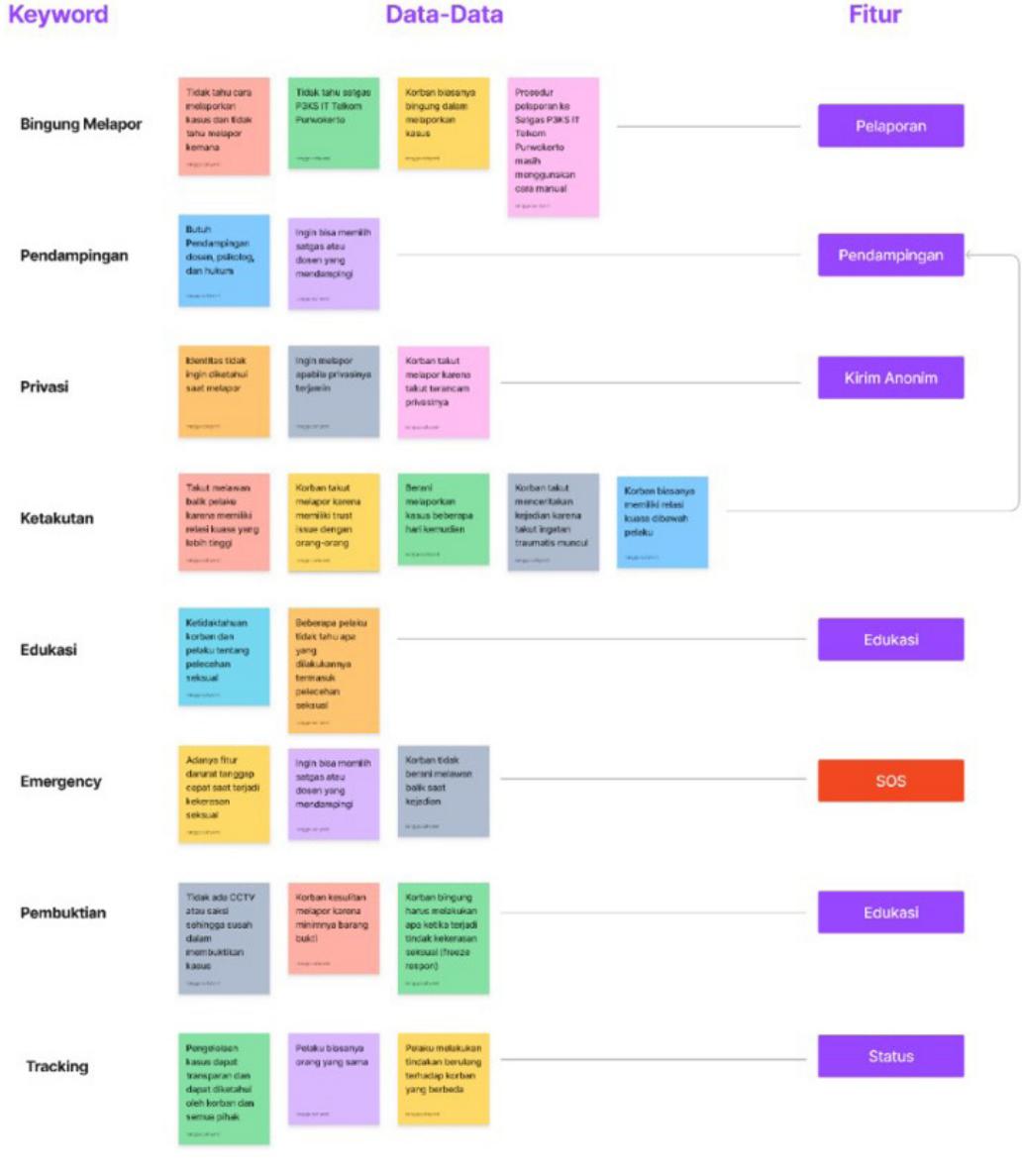
Figure 1 Affinity diagram Source: Personal documentation, 2023
Figure 1 is an affinity diagram that illustrates the results of the interviews in the previous stage. The data was sorted based on organization and similarity of issues. Furthermore, the data is categorized into specific keywords and developed into features. Figure 1 shows 8 keywords from user interviews and the P3KS IT Telkom Purwokerto Task Force. The keywords consist of several aspects: confused by reports, help, privacy, scary, education, emergency, evidence, and tracking. From these keywords, lines are drawn to get answers through features. These features include a report, help, anonymous reporting, education, SOS emergencies, and status tracking.
3. Ideate
The features defined in the previous stage are then integrated into the user flow. User flows are the stages users will go through when using the application. Figure 2 shows an overview of the user flow of the Saling Lindungi application.
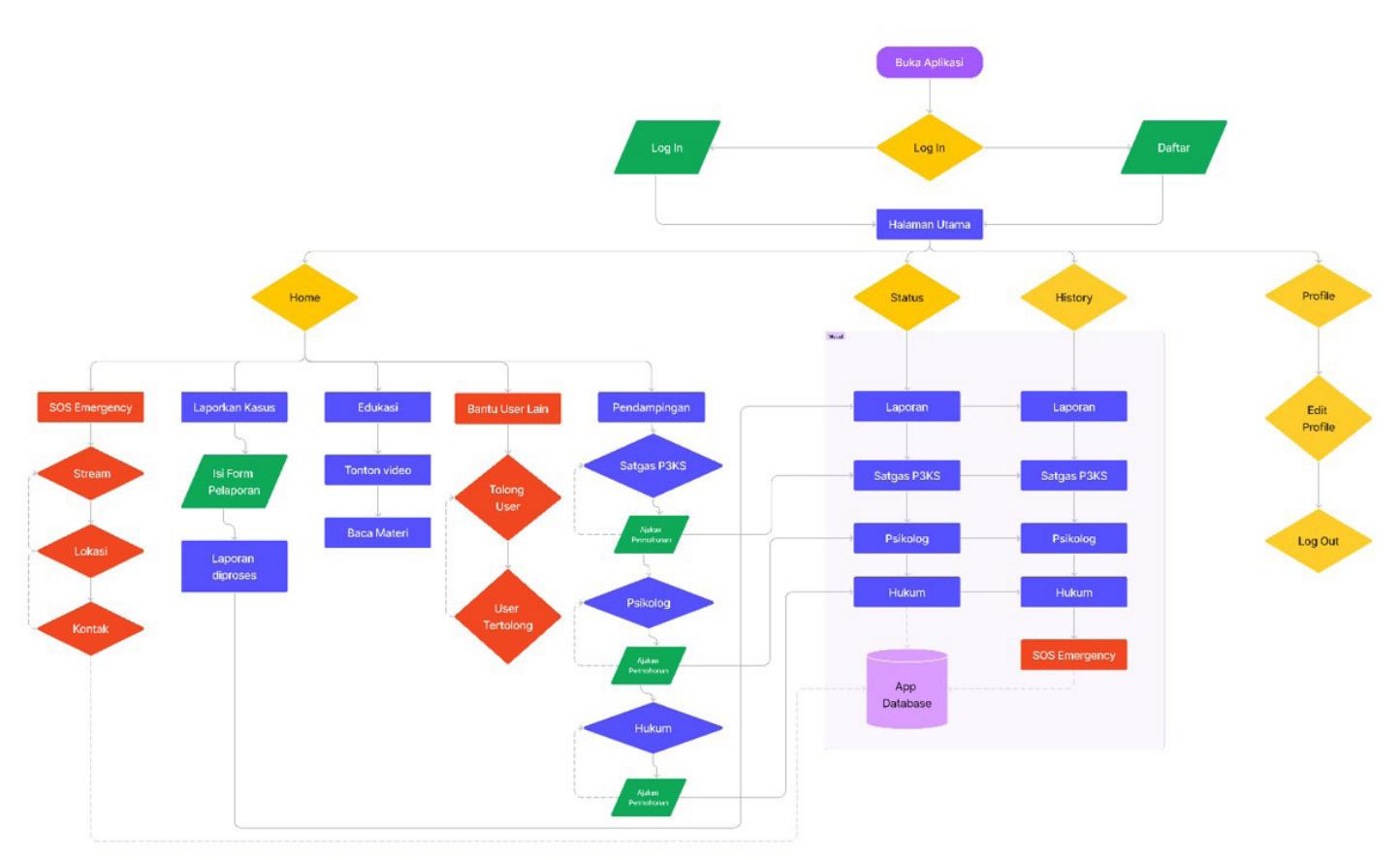
Figure 2 User flow Saling Lindungi Application Source: Personal documentation, 2023
The results of the user flow in Figure 2 are secondary features. These features include onboarding, login, registration, homepage, history, status, profile, chat, and notification. Furthermore, these features will be realized as wireframes. A wireframe is a sketch or skeleton of the application. The purpose of creating a wireframe is to provide a reference for creating design elements for the application. Figure 3 shows a visualization of the features of the wireframe.
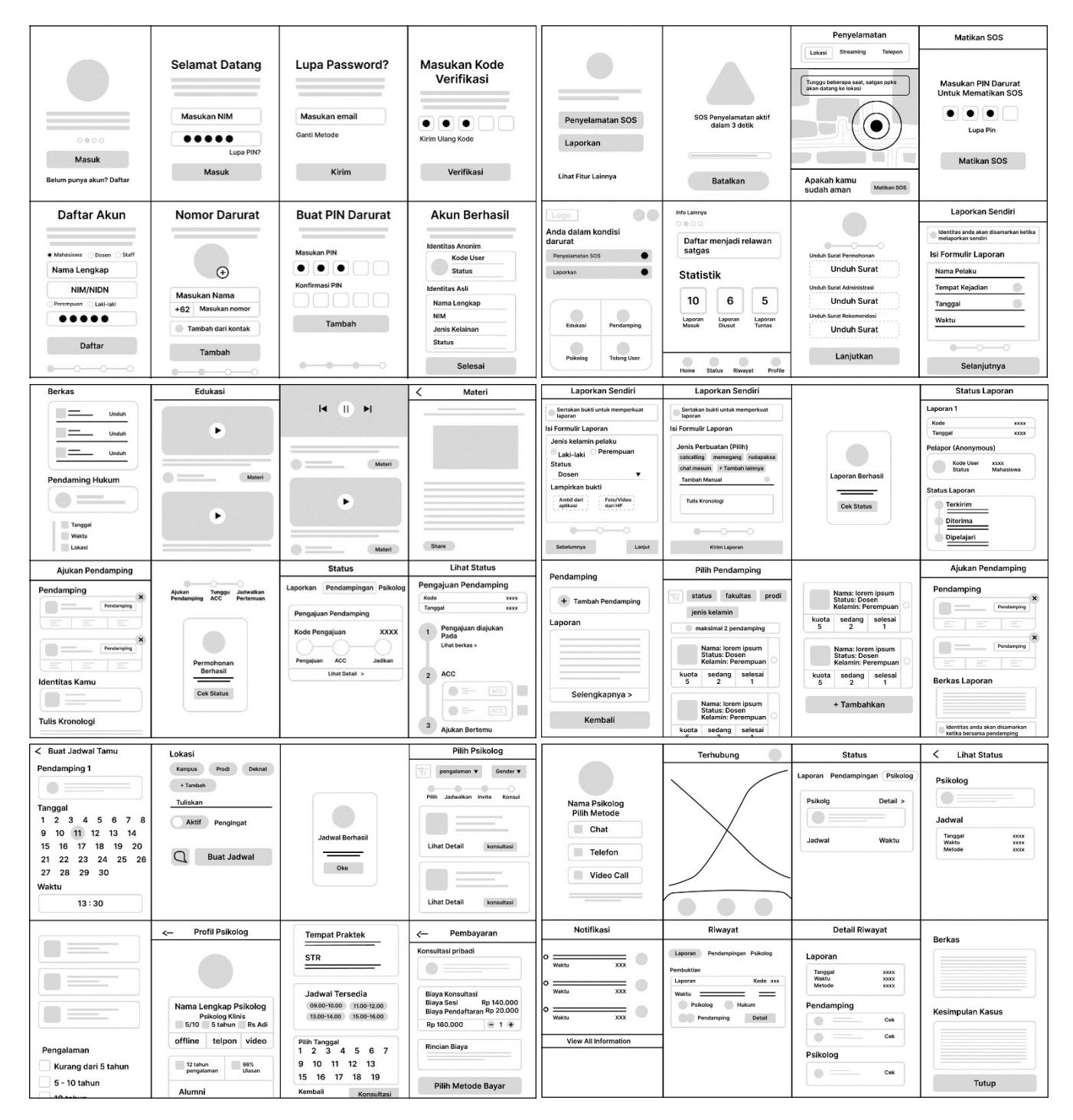
Figure 3 Wireframe Saling Lindungi Application Source: Personal documentation, 2023
The UI guideline is performed in this step to guide the user interface design elements. The user interface guidelines aim to give the design the same tone, and the design elements should follow the user interface guidelines. The user interface guidelines include colors, logos, buttons, and icons. Figure 4 is the user interface guide for Saling Lindungi application.
Figure 4 UI Guidelines Saling Lindungi Application Source: Personal documentation, 2023
The colors used in the user interface design of the Saling Lindungi application are purple with code #7258F9 and red with code #F84145 as the primary colors. Purple gives the impression of courage, spirituality, great hope, dignity, and independence and symbolizes women's struggle (Lianawati, 2020). Meanwhile, the red color represents the functional needs of the SOS emergency feature. The red color gives the impression of an emergency and a quick response.
The typography uses the Roboto font, with variations of Roboto bold 24 px used for titles, Roboto semi-bold 16 px used for sub-titles, Roboto regular 14 px for macro-information, Roboto regular 12 px for text, and Roboto regular 10 px for micro-information. Then, the logo for the Saling Lindungi applications was created using a pictogram style with purple and white colors. In the logo's center, three pictograms depict a formation to protect the person in the middle. The philosophy of this logo is to represent that the Saling Lindungi applications are ready to protect their users.
The icon uses a flat design style to match the visual identity of the Saling Lindungi app, which uses the same flat design concept. The icon type uses glyph and line styles. Furthermore, a call to action (CTA) button is used on websites or applications to guide users in converting user actions. Some of the conversion actions that users perform are accessing other features, making transactions, switching pages, and other actions. In the design of the Saling Lindungi application, the main features, such as reports, registration, and help, use the color purple. Then, the CTA button uses red and pink colors to represent "SOS" emergency conditions and psychological assistance. These different colors and features aim to make it easier for users to use the application according to their functions and needs.
4. Prototype
In the prototyping step, the user interface (UI) design is visualized based on the integration between wireframes and user interface guides. Figure 5 is the result of visualizing the user interface design of the Saling Lindungi application.
Figure 5 UI design of onboarding, register, login, and homepage Source: Personal documentation, 2023
Figure 5 shows the user interface design, including the onboarding, registration, login, and main page features. Users will be guided to the onboarding screen when they first use the app. This feature provides users with information about what this application can do. Users can use the feature without logging in or accessing the registration feature if they need an account.
In the registration feature, users fill in their identity, emergency contacts to stay in touch with the relevant person, an emergency PIN to turn off the SOS emergency feature, and anonymity. If the user has an account, they can access the login feature. Users will then be redirected to the main page.
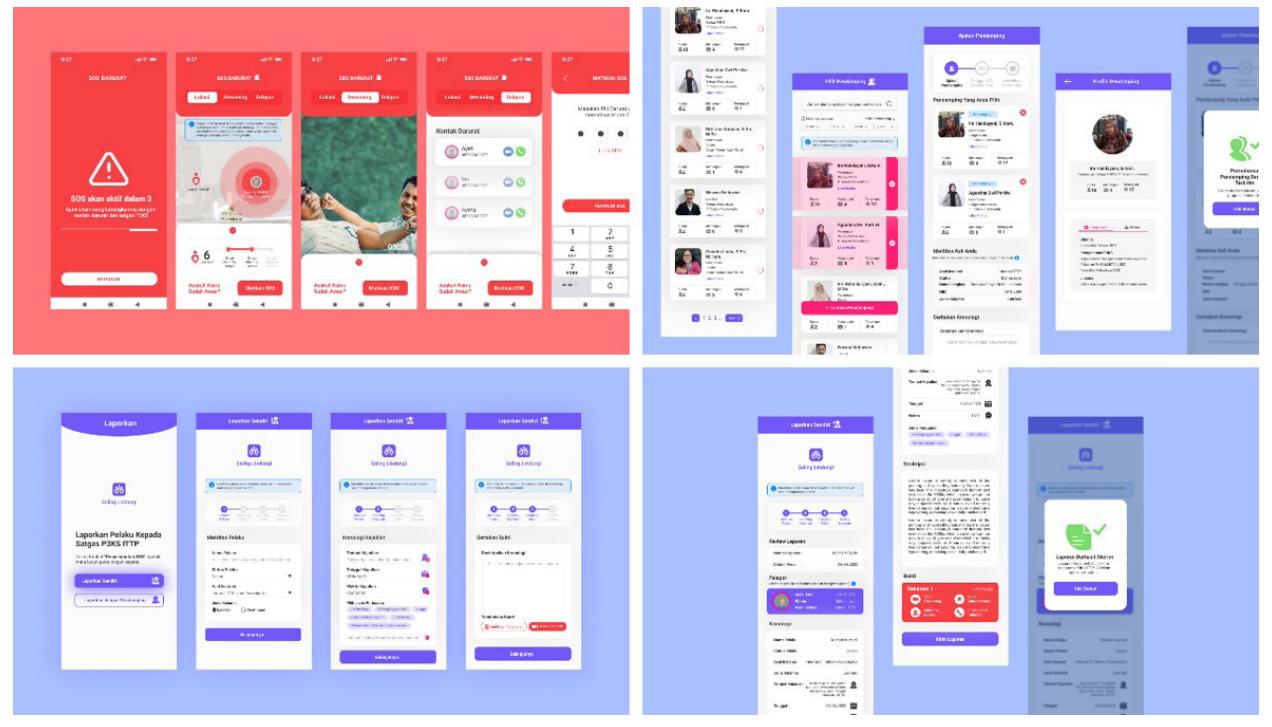
Figure 6 UI design of SOS emergency, Task Force assistance, and report cases Source: Personal documentation, 2023
Figure 6 shows the visualization of the user interface design for the SOS emergency feature, assistance with the IT Telkom Purwokerto P3KS Task Force, and case reporting. When users need emergency assistance after a sexual assault occurs, they can access the SOS emergency feature. In this feature, users can connect with the P3KS IT Telkom Purwokerto Task Force and other users to request assistance, access emergency contacts, stream video, record audio, and track location. The output of these features can further prove the occurrence of sexual harassment cases in court.
Users can also choose the P3KS Task Force, which will help provide assistance or report cases. Users can also create a schedule with the IT Telkom Purwokerto P3KS Task Force using the help feature. Then, in the case reporting feature, users can report themselves or ask for help to report to the P3KS IT Telkom Purwokerto Task Force.
Figure 7 UI design of psychology assistance and request lawyer assistance Source: Personal documentation, 2023
Figure 7 shows the psychological and legal support features. In the psychological help feature, users can select a psychologist to help them. Users can use filters to select psychologists based on gender, experience, and price, or they can search it by name. Users can also view the psychologist's experience, performance record, rating, feedback, quota, and profile. If the user feels matched with a psychology profile, the user can make an appointment for a consultation, both online and offline. In the online method, users can use video calls or text chat. While offline, users can make an appointment to meet with a psychologist. Users can choose to use the free psychology consultation on campus or seek paid psychology off campus.
Then, in the lawyer assistant feature, users can make requests through the application by sending files to get legal assistance. Furthermore, the P3KS IT Telkom Purwokerto Task Force will process the file and provide recommendations for lawyers to help victims from the legal side. Users can use this feature if the case requires a court.
Figure 8 below completes the design of secondary features such as notifications, chat, and history. Notifications serve to receive feedback after a user has interacted with the app. Users also receive notifications when they receive status updates from the P3KS Task Force, request approval from an online lawyer or psychologist, another user needs help, or receives notifications from the system. The chat feature communicates with the P3KS Task Force, psychology, and lawyers. In addition, there is also a history feature to view actions that users have taken in the application.
Figure 8 UI design of feature notification, chat, and history Source: Personal documentation, 2023
Figure 9 UI design of feature status, education, and help other users Source: Personal documentation, 2023
Figure 9 shows other users' status, education, and help request features. The status feature aims to track processed cases for transparency. In the education feature, there are educational videos and articles on how to avoid sexual violence, how to report cases, how to prevent it, and other matters related to handle sexual violence. Then, the feature helps other users, which means that users can assist other users who need emergency assistance from sexual violence.
Users can also access the map and go to the location. This application is called "Saling Lindungi" because of the way it works, using collective users to protect other users from sexual violence and vice versa. Users not only request help, but also provide assistance. The result of the Saling Lindungi application user interface is then integrated into a prototype using Figma, as shown in Figure 10 below.
Figure 10 Integrated UI design Saling Lindungi apps to become prototype. Source: Personal documentation, 2023
5. Test
After visualizing the user interface design in a prototype step, it was tested using usability testing methods to determine its effectiveness. Testing was conducted online and offline with 20 users (10 for each method). Online testing was conducted using the Useberry application to obtain data on the heatmap's design effectiveness and how users' presence could complete the scenario. Offline testing was conducted to collect qualitative data based on user feedback for evaluation.
Testing was done by providing scenarios to users. In this scenario, users can access the SOS emergency feature from the onboarding page to turn off the SOS emergency by filling in the emergency PIN. If a user can complete the scenario, then the scenario is successful. Nevertheless, the scenario is considered a failure if a user fails to do these tasks.
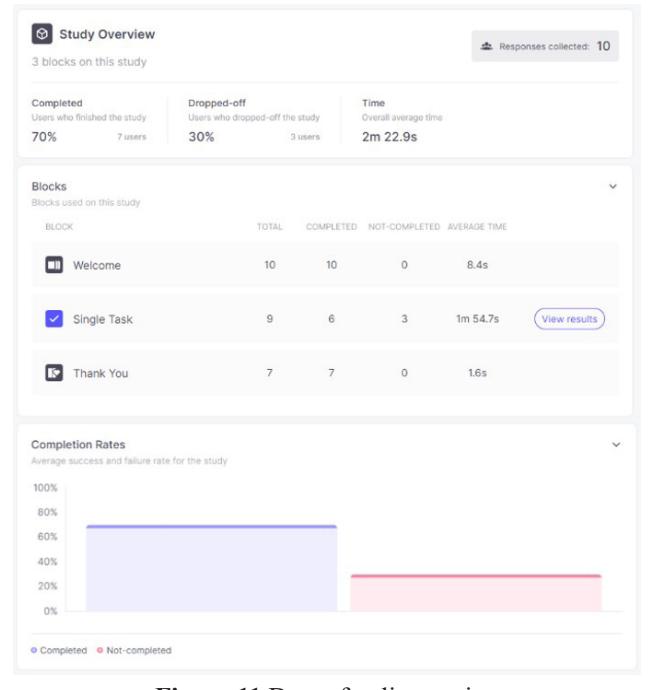
Figure 11 Data of online testing Source: Screen Capture Useberry Apps, 2023
Usability testing has been conducted online to collect heatmap data using the Useberry app. The prototype link integrated with the Useberry app was sent to 10 users for testing. This Useberry app recorded the heatmap, the places on the screen where the user clicked, and the user's success rate in completing the scenario. Figure 11 shows that of the 10 users who used the prototype, seven users, or 70%, could complete the scenario (a single task) in an average of 1 minute and 54 seconds. While three users exited or could not complete the scenario, two users skipped the scenario, and one user could not complete the task.
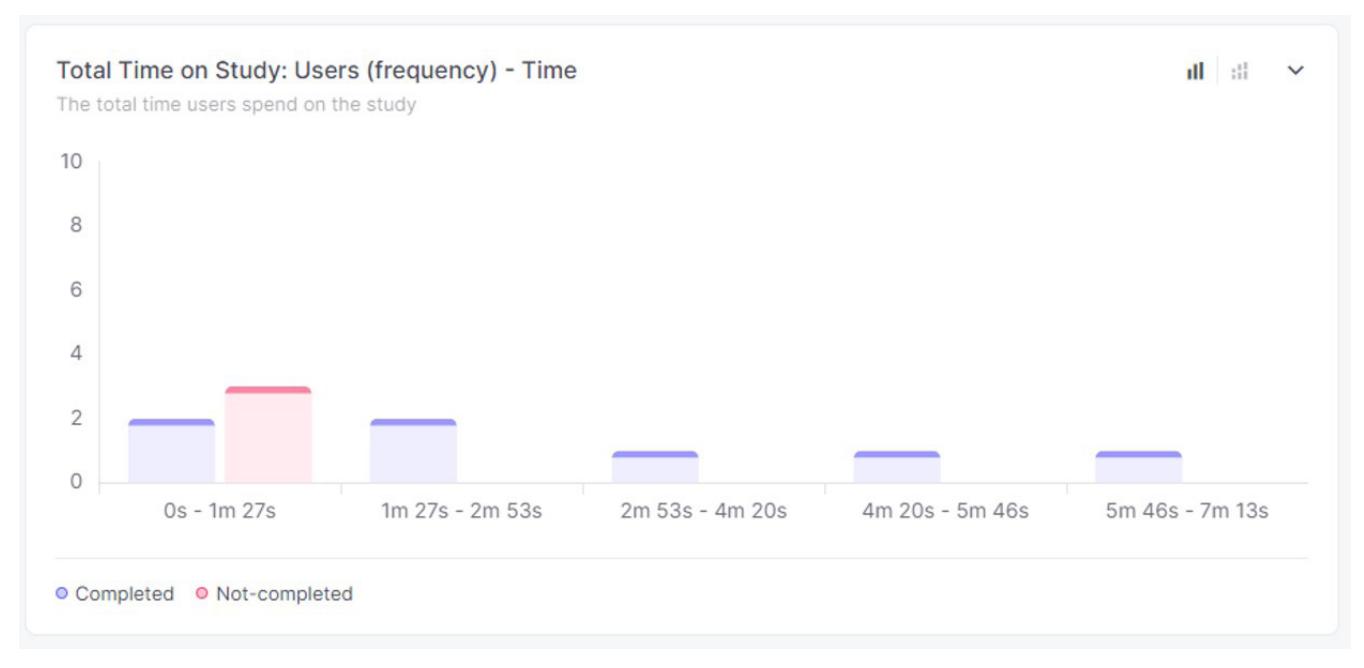
Figure 12 Data of time rate user using prototype Source: Screen Capture Useberry Apps, 2023
In addition, the time-frequency required for users to complete the scenario has a different intensity between users. Users who cannot complete the scenario take 1 minute and 27 seconds, while users who can complete the scenario take 1 minute and 27 seconds, or more. Users who completed the scenario in more than one minute were exploring the prototype. Thus, they tried other features besides the ones already in the scenario. This result makes the average usage time too long. These things can be proven by looking at the red color on the heatmap. The color indicates the intensity at which the user clicks on the screen. Figure 13 is the user interface heatmap for the Saling Lindungi application.
Figure 13 Heatmap Saling Lindungi apps while testing Source: Screen Capture Useberry Apps, 2023
The data in the heatmap in Figure 13 results from online usability testing. The result is that users can complete the scenario to access the "SOS emergency" feature from "login" to the end of the scenario. Users also interacted extensively with the call to action (CTA) button. CTA buttons can guide users to the following action or other features. In addition, users also use the prototype design intuitively so that the screen that is clicked is the screen that can do action such as CTA buttons, text fields, or hover navigation. In addition, testing was also conducted offline. Offline testing invites 10 users to try out the prototype. Then, users are interviewed to provide feedback on weaknesses, obstacles, and things that need to be improved.
Figure 14 Participant was conducted offline testing Source: Personal documentation, 2023
The offline usability testing conducted on 10 users showed that 8 completed the scenario and 2 failed to. In addition, some suggestions from users need to be evaluated. These suggestions are as follows:
- 1. The navigation button on the smartphone should be fixed so that the user does not need to scroll down to go back to the previous page.
- 2. Adding a rating or evaluation feature to the Task Force, psychology, and lawyers' assistance to evaluate their works.
- 3. Adding an arrow or back button to the report feature will make the user go back to the previous page.
- 4. The name of the "assistance" feature should be renamed to "Satuan Tugas," or Task Force, because the user thought this feature was psychology assistance.
- 5. The layout on the homepage should be changed so that the feature "help other users" must change to "lawyer assistance."
After going through the testing step and getting the above results, improvements were made by returning to the prototype step. The results of these improvements are as follows:
1. Fixing the navigation button so that it is always in a fixed position.
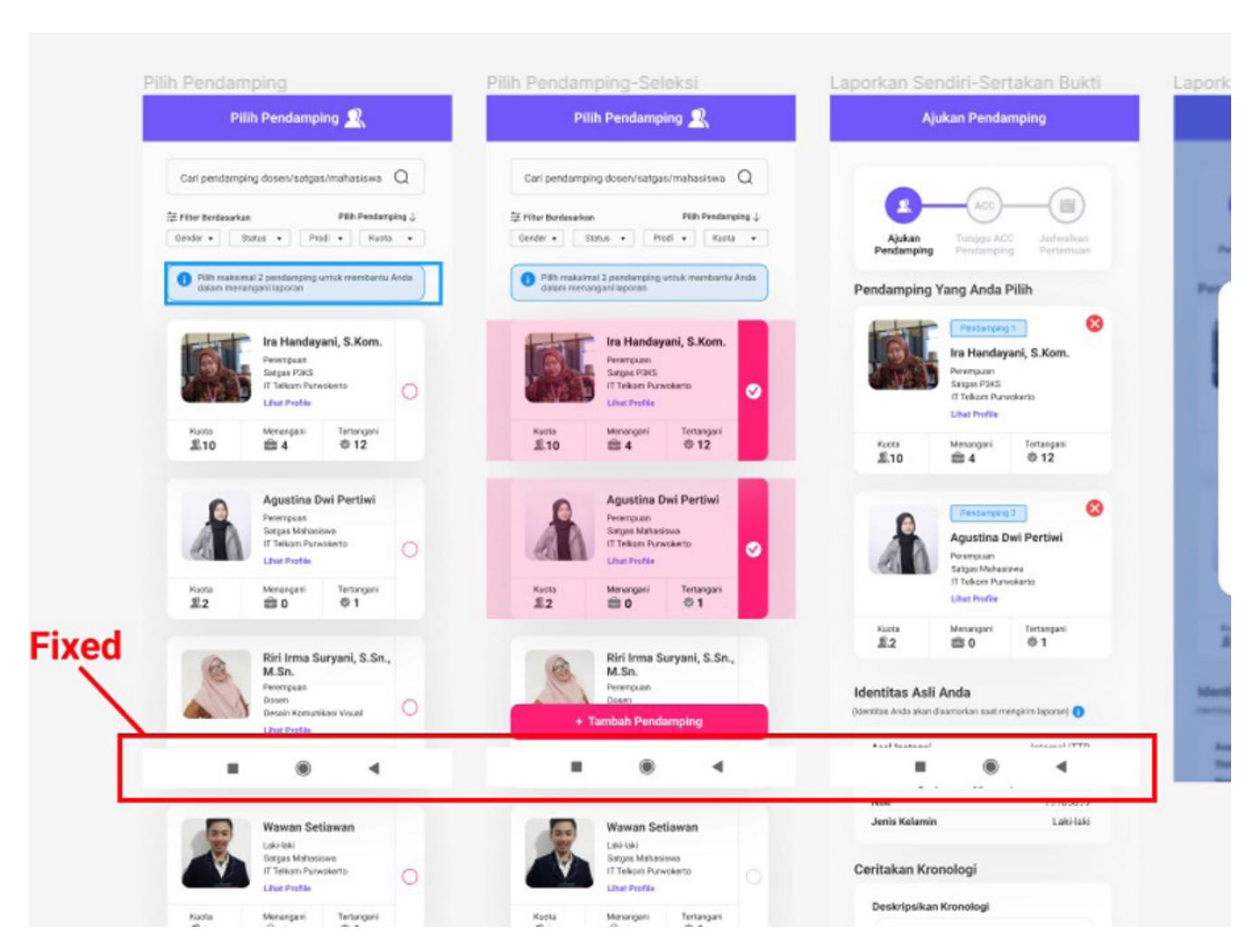
Figure 15 Improved navigation button Source: Personal documentation, 2023
2. Adding rating and evaluation features.
Figure 16 Rating feature Source: Personal documentation, 2023
3. Adding a back arrow button.
Figure 17 Added back arrow Source: Personal documentation, 2023
4. Renaming the "help" feature and changing the layout of the "help other users" feature to the "legal assistance" feature.
Figure 18 Changing layout and feature on homepage Source: Personal documentation, 2023
Conclusion
Handling sexual violence in higher education cannot be solved with just one snap of the fingers. Moreover, cases of sexual violence occur in universities, where Indonesia's next generation is moulded. There must be efforts and support from various parties, such as educational institutions, legal institutions, social institutions, the government, and society. One of the efforts that can be made is to create a media platform for handling sexual violence in the form of an application, which is also supported by TPKS Law 12 of 2022.
The "Saling Lindungi" application departs from the spirit of cooperation of the Indonesian people to protect each other and prevent sexual violence. The application design uses purple and red as primary colors. The purple represents courage, spirituality, great hope, dignity, and independence, and it symbolizes women's struggle. Meanwhile, the red color reflects the need for functionality to give the impression of an emergency, and a quick response. The font used uses the sans-serif type Roboto font because the level of legibility makes it easier to read on the mobile application screen.
In making applications, user interface design is needed to bridge application media and users. The method used in making the user interface design uses design thinking, which consists of five stages: empathize, define, ideate, design, and prototype. In the empathize stage, the data collection process was conducted through interviews with victims, the P3KS Task Force, and students. The data was then sorted
using affinity diagrams at the define stage to identify problems experienced by victims. The problems obtained consist of victims' confusion in reporting, victims needing assistance during case handling, victims wanting their privacy to be maintained while reporting cases, victims having difficulty reporting due to a lack of evidence, the need for educational features as a prevention effort, and the need for an SOS emergency feature when they need immediate handling calls.
The problems that have been identified are then addressed at the ideation stage by creating reporting features, providing case assistance, reporting anonymously, proving cases, providing education, and addressing SOS emergencies. These features were then realized in user interface designs at the design stage, which resulted in 73 screen designs. Then, the design was integrated into a prototype ready to use. The prototype design was then tested to determine how easy it is for users to use the application. Testing was carried out using the Useberry application, and the results showed that 75% of users completed the design scenario, while the rest dropped off or failed to complete it.
The design of the mutual protection application still needs continuous improvement, and the failure ratio can be reduced so that it can become a medium for handling sexual violence that can facilitate victims in handling their cases. In addition, cooperation between stakeholders such as the campus, the P3KS Task Force, law enforcement officers, psychological institutions, and the academic community is needed to support the running of this application.
Acknowledgement
The authors express great appreciation to the P3KS Task Force of IT Telkom Purwokerto and victims of sexual violence, whose identities are withheld to protect their privacy. They have contributed to data collection through the emphasized steps. This data is beneficial because it is based on the victim's experience and the point of view of the P3KS Task Force of IT Telkom Purwokerto as a stakeholder who will implement this application.
In addition, participants, who cannot be written down individually, have contributed to both offline and online usability testing. They have contributed to data collection on design weaknesses and suggested the prototype design. These data help evaluate and improve the design for better contributions to sexual violence prevention and response.
References
- Agung (2019) "Wonder" Aplikasi untuk Tangani Kekerasan Perempuan dan Anak, ugm.ac.id. Available at: https://ugm.ac.id/id/berita/18845-wonder-aplikasi-untuk-tangani-kekerasan-perempuan-dananak (Accessed: 24 June 2022).
- Andriansyah, A. (2022) Komnas Perempuan: Kasus Kekerasan Seksual di Lingkungan Pendidikan, Paling Tinggi di Universitas, voaindonesia.com. Available at: https://www.voaindonesia.com/a/ komnas-perempuan-kasus-kekerasan-seksual-di-lingkungan-pendidikan-paling-tinggi-diuniversitas/6525659.html (Accessed: 5 June 2022).
- Arethusa, Z. A. (2022) Meningkatnya Pelecehan Seksual di Indonesia 10 Tahun Terakhir Halaman 1 - Kompasiana.com, www.kompasiana.com. Available at: https://www.kompasiana.com/ zakariyaalana2770/62c69e6ebb44865000355a42/meningkatnya-pelecehan-seksual-diindonesia10-tahun-terakhir (Accessed: 16 December 2022).
- Brown, T. (2009) Change by Design: How Design Thinking Transforms Organization and Inspires Innovation. 1st edition. New York: Harper Business.
- Kementerian Pemberdayaan Perempuan dan Perlindungan Anak (2022) Undang-Undang Tindak Pidana Kekerasan Seksual (UU TPKS) Nomor 12 Tahun 2022. Indonesia.
- Lael, S., Mayasari, R. & Prihandani, K. (2021) 'Implementasi Ui/Ux pada Pembayaran Pelanggan Internet Rumah Menggunakan Metode User Centered Design (Studi Kasus PT Atlas Lintas Indonesia)', 4, pp. 65–87.
Jurnal Sosioteknologi | Volume 23, No. 1, March 2024
- Lianawati, E. (2020) Mengapa Warna Ungu Menjadi Simbol Perjuangan Perempuan?, hypatiaindonesia. co. Available at: https://hypatiaindonesia.co/2020/10/20/mengapa-warna-ungu-menjadi-simbolperjuangan-perempuan/ (Accessed: 15 June 2023).
- Pratama, S. P., (2020) Perancangan Aplikasi Sexual Harassment Guna Memberikan Edukasi Mengenai Kesehatan dan Kekerasan dalam Hubungan Remaja. Universitas Muhammadiyah Ponorogo.