

1. INTRODUCTION
The digital literature era has brought rapid transformation to children literature and media, from edutainment application to digital picture book. Each of media offers new method to support story understanding through their interactivity that a traditional media does not have. The popularity of digital media has also adding mobile device as a part of many researches from literature to education in classroom activity [1-5]. The rapid development of mobile device including app-book has also encouraging scholars to create evaluation tools in order to find a better interactive feature for user. Most of analysis tools analyze the usability of the device as a whole [6- 9] while few tried to analyze the details beyond devices' interactive features and how it brings different type of knowledge for literacy learning [10-12].
We believe that connection between interactive feature and story inside story, whether inside app-book or other application will improves the distribution of information between device and user. Thus we interested in investigating whether the connectivity between interactive feature and story are already included inside the coding in existing evaluation tools and what kind of assessment can we imply to analyze the correlation between interactive feature and story. The study itself focuses on storytelling app-book as its feature has
clear function and limitation. To answer the question this study collected existing analysis tools focusing on the usability of interactive feature inside children appbook. All the tools were reviewed according to their focus, coding, strength and limitation. This study was also seeks knowledge from previous research on three different fields: interactive design, children education and lastly children literature field to investigate needed coding in the new tool. The collected information was analyzed to produce a new coding of analysis tool for storyrelated interactive feature in children app-book. Our thinking method frame is as seen below.
Research Question How to analyze the correlation between interactive feature and story inside app-book? Literature Study I Review of five existing evaluation tool Literature study II Interactive feature from the perspective of literature, education and interactive media
Fig 1. Materials and methods of the study
Development of new evaluation tool Extracting coding requirements from previous analysis
2. EVALUATION TOOLS FOR MOBILE DEVICES
Previous studies have created diverse evaluation tools in mobile device to bring better application for user. The studies cover not only the device's usability but also the interactive feature inside it. In order to find better evaluation tools, we review five different evaluation tools for mobile device, website, and e-book according to their preferences.
2.1. Evaluation tool for mobile device' usability
Heuristic evaluation [13] is originally an analysis tool created to evaluate the usability of website application and has been used to evaluate e-book as well as other mobile devices. The tool's coding spread in ten principles called heuristic, which connected to usability function of the device. Its principles include visibility of system status, match between system and the real world, user control and freedom, consistency and standards, error prevention, recognition rather than recall, flexibility and efficiency of use, aesthetic and minimalist design, help users recognize, diagnose, and recover from errors, and help and documentation. Some of researcher however modified the coding according to their research needs [14].The advance of heuristic evaluation is it brings comprehensive evaluation for interface usability with quicker, cheaper, and easier method as it can be performed with minimum three expert evaluator.
Another well-known evaluation tool for mobile device's usability is Web content accessibility guidelines (WCAG) 2.0. The tool evaluates general access in content area and specialized for user with disabilities. It has four principles called POUR (perceivability, operability, understandability, and robustness) with total of 12 guidelines inside each principle [15]. The mechanism of WCAG 2.0 brings advance in covering wider user, especially user with disability. Both of heuristic evaluation and WCAG 2.0 however has similar limitation in revealing details inside device aside from its usability.
2.2. Evaluation tool for mobile device's multimedia feature
While Heuristic evaluation and WCAG 2.0 cover comprehensive analysis in mobile device's usability, a number of past researches tried to identify and analyze multimedia features inside mobile device. Clark & Meyer produced another analysis tool that focuses on multimedia feature inside e-book, which advances in giving details knowledge types in graphic and multimedia element. The tool also capable in describe personalization element that motivates attention and pedagogical assist. The coding includes five principles: multimedia, contiguity, redundancy, coherence, and personalization, along with five types of graphics addition: decorative, representational, organizational, relational, transformational, and interpretive [11]. This tool however has limitation in identifying interaction design area and how it is being represented in e-book.
In order to analyze user behavior toward e-book interface, Roskos, Brueck, & Widman introduced Blueprint Key Tool, a analysis tool that give a clue of user behavior and action in choosing the features through flowchart map from first action to another within application's pages *12]. The tool however has limitation in locating evidence of knowledge types in design architecture. The analysis process will also take longer time to construct, as it requires high degree of multimedia learning knowledge from the reviewer.
On their research, De Jong and Bus focus in identifying design categories that serve as a macro-framework for evaluation of e-book construction [10]. Its five coding includes audio, video, and text in multimedia factor along with choice, control, and engagement in design factor. The strength of this tool is it can identify multimedia core elements for literacy learning and reveals design elements that support learning look in the e-book. The tool however has limitation in revealing pedagogical assists
function and types of knowledge inside e-book's environment. It also failed in identifying cognitive demand of the ebook. The brief review from five analysis tools is as seen in table 1.
One of the coding from their tool however reveals how multimedia in picture can carry not only details from the text but also conveys some of the text's fragment and even dramatize the whole scene. De Jong and Bus argue that dynamic visual or moving images can convey feelings, mood and other associations with story, thus improve children's personal response; a response that connect story with reader's real experience [16]. According to them there are three ways in how multimedia in pictures can correlate with story. The first degree is by becoming its details by applying multimedia item as visual decoration and adds more fun aspect without relevancy necessity with the story. The second degree is what they named it as fragment, a multimedia feature that imitates parts of the text in the story. The last degree is when it's not only imitates but also dramatizes the story and adding deeper meaning into it. The coding however focuses solely on dynamic visuals as its subject. We believe that the using of coding above can be applied in different part aside from dynamic visual to reveals the usability of interactive features.
Table 1.Comparison of Usability Evaluation for Mobile Devices
| Nielsen (1995) Focus / Purpose Comprehension evaluation in user interface inside application Coding Checklist set with 10 principles called 'heuristic' Advantages Quicker, cheaper, and easier evaluation method for user interface usability evaluation Limitation Focuses only in usability area. World Wide Web Consortium (2008) Focus / Purpose Evaluation on general access in mobile application's content area specialized for disable user Coding 12 guidelines in principle called POUR (Perceivability, operability, understandability, robustness) Advantages Accessible for wider user (user with disability) | |
|---|---|
| Limitation Focuses only in usability area. | |
| De Jong& Bus (2003) | |
| Focus / Purpose Evaluation on app-book's multimedia effectiveness and graphic interactivity addition for | |
| literacy understanding | |
| Coding Book processing, Multimedia in picture, Multimedia connected to printed or spoken | |
| text, Interactivity of the story, Interactive legibility | |
| Advantages Identify and reveals core elements of multimedia along with design element that support literacy | |
| Limitation Unable to reveal pedagogical assists function and types of knowledge inside app-book | |
| environment, and can't identify cognitive demand of the app-book. | |
| Clark & Meyer (2008) | |
| Focus / Purpose Identify the knowledge inside graphic and multimedia feature inside app-book | |
| Coding Multimedia, Contiguity, Redundancy, Coherence and Personalization with addition of five graphic types in multimedia design. | |
| Advantages Gives detail on types of graphic knowledge & multimedia elements, personalization | |
| element that motivate attention, and pedagogical assists. | |
| Limitation Limited in interaction design area and how it is being represented in app-book. | |
| Roskos, Brueck, &Widman (2009) | |
| Focus / Purpose Investigation of learning-oriented assembly | |
| Coding User behavior investigation through action's flow map | |
| Advantages Reveals user behavior and act in choosing application's feature | |
| Limitation Limited in locating evidence of knowledge types in design architecture. Requires high | |
| degree of multimedia learning knowledge to use the tool and longer time to construct the evaluation. |
3. WHAT WE NEED IN STORY-RELATED INTERACTIVE FEATURE
Based on the review, we conclude that most of methods we found focus more in either the whole usability of the device or focus in its interactivity usability and its correlation with literacy comprehension. The tools above seem to forget the role of hotspot inside gesture or touch user interface (TUI), which operate most of interactive feature in children app-book.
Gesture itself can be defined as any physical movement that can detect and respond without the help of a traditional pointing device such as a mouse or stylus [17]. Most gestural interfaces or touch user interfaces (TUI) can be categorized as either touch screen or freeform. Different mobile platforms can perform various TUIs according to their user preferences, thus create diverse customization possibility for each appbook platform.
To find out the needs from story-related interactive feature this study focuses on TUI as the object of analysis. Literature source from three different areas connected to interactive design, children education and children literature field are use to backup the hypothesis. While interaction design field provide TUI as the object of this study, children literature enrich the knowledge of emotive expression and personal response which can be achieved through interaction between user and story. Children education field shows how interactivity are used for education and how children response to the tools.
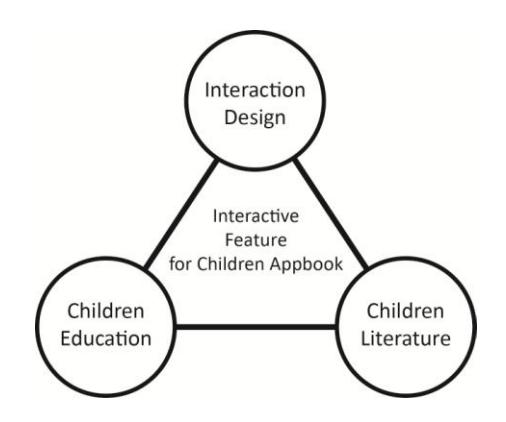
Fig 2. The correlation between three different fields with interactive feature in children app-book
3.1 Interactive feature as a container of literature expression
Nikolajeva & Scott believes that the collaboration between text and image in traditional picture book creates seven elements of literature expression: setting, characterization, narrative perspective, time and movement, mimesis and modality, figurative language, and lastly metafiction, intertext, and paratext. These elements have potential in helping readers understanding the story development and its plot [18]. Aside from literature expression, Nikolojeva also found that character in picture book acts as a narrative agent which connects author, narration, and readers as a whole [9]. App-book however offers a new channel for this expression inside their interactive feature.
In their experiment, Moon and Choi argue that not all of interaction feature in existing app-book includes literature expression. The absence of the literature expression are not only produce meaningless interactive feature which not correlated with the story, it also tackle the storytelling process with distraction. They also found that the more literature expression includes in interactive feature, the more it will be related to the story, helping children to reach higher story comprehension [20].
3.2 How Children respond to interactive feature
The development of mobile device and interactivity in education field has brought a lot of research on the connection between children as young children and their respond to the device. A research from Michael Cohen Group LLC revealed how three age groups of children respond to iPad's interactive feature and its touch screen and how tablet device bring immersion by offering interactive experience that mirrors children's natural constructivist learning [21].Researches also agree that tablet device can integrate into the daily life of students and redefine the learning space constitution by providing no constraints of specific time and play [22].
Despite of its immersion, according to some studies, the embeded non-related content inside interactive feature in enhanced e-book may distract young readers from storytelling process [23] including embedded hotspot and animations inside illustration, games, and video inside app-book [24]. Another studies examined how small size of touch screen's input area creates difficult task for infant and young children. Small symbol for text button, navigation and other interactivity function can also tackle the literacy comprehension, as it is difficult to recognize by the reader. [25]
Aside for the famous use of "tap" and
"drag/slide" command in app-book, young children age four and above are surprisingly competent with diverse command like free rotate, pinch, flick, and spread [17]. Meanwhile Park also find that improving graphic interactivity to TUI brings more familiarity to the degree of interaction between user and character that resulted in improvement of gesture manipulation and icon usability [25].
4. CREATING A STORY-RELATED INTERACTIVE FEATURE
From the information above we can conclude that there are three important things to investigate the correlation between interactive feature and story inside app-book: The availability and visibility of the interactive feature, its function relating to the story, and how it delivers the emotive expression within its visual. As discussed above, the visibility of interactive feature is important as children need to recognize it first before they can interact with it. The availability and visibility of one's' feature can be determined by its feature (visual effect, sound effect, etc) and how they are translated into pleasing visualization (font, color, and size choices). Not only easily to recognized, the feature need to be easily executed by young children and the execution itself would not disturb the storytelling process.
The second criterion is the function of interactive feature related to the story. As De Jong and Bus revealed in their study, in order to analyze whether an interactive feature can improve story comprehension we need to find out either if it only decorate the text, act as a text representative or even enrich the story with dramatizing effect. However instead of moving images, TUI especially
hotspot button would be a better analysis object as it has more potential in connecting user with the story while delivering the story message.
The last criteria to be included is how interactive feature deliver emotive expression from the story through its visualization, whether in color, pattern, movement or sound and stimulate the emotion within characters and story.
Tabel 2. Codings for hotspot evaluation in children app-book
| Coding | Qualification | ||
|---|---|---|---|
| Availability, visibility, and usability | Includes sound and visual effect Visually pleasing with font choice, color and sizes | ||
| Easily recognized by children | |||
| Easily executed by children The execution of interactivity does not disturb the storytelling process | |||
| Connection with story | Decorative | Enjoyable and interesting Can gain children's attention Gives frequent feedback to carry on | |
| Fragment | Represent one or some part of the text Makes children engaged with the story | ||
| Dramatizing | Gives different meaning apart from text yet enrich the story Allows children to enhance story comprehension | ||
| Emotive expression | Its part (color, font, line, pattern) and execution's output (movement, sound, etc) stimulate particular mood in the story Its part and execution's output (movement, facial expression, voice, etc) represent character's characterization and character's emotion | ||
5. CONCLUSION
The rapid development of interactive app-book has leads growing number of researches that provide analytic tools to examine the construction of interactive feature inside app-book. By providing the construction and usability of the interactive feature, not only deliver multimedia learning, an analysis tool can give an insight of better interaction between a story and user.
After reviewing five different evaluation tools we found that most of them ignore the TUI function despite of its direct interaction with user and story. The previous tools also have limitation in revealing the correlation between interactive feature and story, which has big role in improving story comprehension. To construct new analytic tool we combined three different aspects from literature, children
education, and interactive design field and extracted important criteria for story-related TUI inside hotspot button. The codings are divided into three aspects: the acknowledgement of TUI availability and usability from user, its function related to the story, and emotive expression within TUI. The second coding especially will determine how far a TUI button connecting with story.
While our evaluation tool answered our research question for the criteria of storey-related interaction feature, we believe that the function and limitation of the tool need to be proven with an assessment of actual app-book. We also hope that the tool will be useful for future research in children digital literature and interaction design area.
6. REFERENCES
- [1] Garland VE. Digital literacy and the use of wireless portable computers, planners, and cell phones for K–12 education. Literacy in technology at the K–12 level: Issues and challenges. 2006; P. 308-321.
- [2] Gray L, Thomas N, Lewis L. Teachers' Use of Educational Technology in US Public Schools: 2009. First Look. NCES 2010-040. National Center for Education Statistics 2010.
- [3] Education in Thailand: let them eat tablets [Internet]. The Economist; 2012 June 16. Available from www.economist.com
- [4] Song SH. All textbooks to go digital by 2015 [Internet]. The Korea Herald; 2011 June 29. Available from www.koreaherald.com
- [5] Inagaki T, Kamei M, Terashima K, &Nakahashi Y. Development of iPad-based learning materials about media production. Proceedings of the 10th International Conference for Media in Education.Beijing.;2012 August. P. 22-24.
- [6] Alsumait A & Al-Osaimi A. Usability Heuristics Evaluation for Child E-learning Applications.Journal of Software.2010; 5(6). P.654-661.
- [7] Billi M et al. A unified methodology for the evaluation of accessibility and usability of mobile application. Unif Access Inf Soc. 2010; 9. P.337-356.
- [8] Huang CH & Wang CM. Usability Analysis in Gesture Operation of Interactive E-Books on Mobile Devices. Design, User Experience, and Usability.2011; P. 573-582.
- [9] Baird C & Henninger M. Serious Play, Serious Problems: issues with eBook applications. Cosmopolitan Civil Societies Journal. 2011; 3(2)
- [10] De Jong MT & Bus AG. How Well Suited are Electronic Books to Supporting Literacy? Journal of Early Childhood Literacy. 2003; 3(2), 147-164.
- [11]Clark R & Mayer R. E-Learning and the science of instruction. San Francisco, CA: Pfieffer; 2008.
- [12] Roskos K, Brueck J, & Widman S. Investigating Analysis Tools for e-Book Design in Early Literacy Learning. Journal of
Interative Online Learning. 2009;8(3). 218- 240.
- [13] Nielsen J. 10 Usability Heuristics for User Interface Design. 1995. Available from www.nngroup.com/articles/ten-usabilityheuristics/
- [14] Huang CH. And Wang CM. Usability Analysis in Gesture Operation of Interactive E-Book on Mobile Devices. Berlin. 2011; 573- 582.
- [15] World Wide Web Consortium. Web content accessibility guidelines (WCAG) 2.0. 2008.
- [16] Sipe LR. STORYTIME: Young Children's Literary Understanding in the Classroom. New York: Teachers College Press; 2008.
- [17] Azis A, Azah N, Batmaz F, Store R, & Chung PWH. Selection of touch gestures for children's applications. Proceedings of Science and Information Conference (SAI): IEEE; 2013. P. 721-726.
- [18] Nikolajeva M & Scoot C. How Picture books Work. London: Garland Publishing; 2001.
- [19] Nikolajeva M. The Rhetoric of Character in Children's Literature. Oxford: Scarecrow Press, Inc.; 2002.
- [20] Moon YS & Choi YM. Digital Literacy Expression According to Interaction of Electronic Picture Books for Infant. Design Convergence Study. 2012; 34. 11(3). 94-109.
- [21] Cohen M, Hadley M, & Frank M. Young childre, apps & iPad. Michael Cohen Group LLC, New York, NY, USA; 2011.
- [22] Culen AL & Gasparini A. iPad: a new classroom technology? A report from two pilot studies. Proceedings of INFuture. 2011. P. 199-208.
- [23] Shuler C, Levine Z, & Ree J. Ilearn II: An analysis of the education category of Apple's app store. New York: The Joan Granz Cooney Center at Sesame Workshop; 2012.
- [24]Vaala S, & takeuchi L. CO-reading with children on iPads: Parents' perceptions and practices. The Joan Ganz Cooney Center at Sesame Workship; 2012.
- [25+ Park, NY. Research for Infant's App-book behavioral pattern applied to multimedia contents. Ewha Womans University; 2013.